
There is a moment in most mobile projects when technology choice stops being theoretical. You have a product to ship, a budget to work within, and two platforms to support. The wrong call does not show up immediately — it shows up six months later when you are maintaining two separate codebases, paying two separate teams, and still shipping features at half the speed you expected.
React Native app development was designed for exactly this situation. One codebase. Both platforms. Most of the performance of native, at a fraction of the cost. This guide is for people who own a business, are founders, or CTOs. It helps them figure out what they need to do to make a React Native project work. They will learn about making architecture decisions for their React Native project and what it will cost. They will also learn about keeping their React project safe with security requirements and how to pick the best way to do things for their React Native project.
What is React Native?
Introduction to React Native
React Native is an open-source React Native framework by Meta that lets developers build iOS and Android applications from a single JavaScript codebase using real native components — not a WebView wrapper. The output is a genuine native app that renders platform-appropriate UI on each OS, which is why React Native products are indistinguishable from natively built apps in the vast majority of use cases.
History & Evolution of React Native
Meta open-sourced React Native in 2015. Adoption accelerated through 2016–2018 as teams realised that one codebase genuinely could replace two. The New Architecture was announced in 2018 to address performance limitations in the Bridge-based system, reached stable release with React Native 0.74 in 2024, and Nitro Modules arrived in 2025 as the next layer of performance improvement. The framework is actively invested in — not coasting.
Current Market Adoption
According to the Stack Overflow Developer Survey 2024, approximately 9.1% of professional developers use React Native actively, stable year-over-year, and comparable to Flutter at 9.2%. Adoption is particularly strong in startup and mid-market product teams where cross-platform app development speed matters more than platform-specific optimisation.
Companies Using React Native
Shopify rebuilt its mobile app in React Native and publicly reported reduced mobile engineering headcount alongside increased feature velocity. Discord found the JavaScript threading model sufficient for their real-time messaging product at scale. Microsoft Teams uses React Native for its mobile client — a notable signal of enterprise-grade confidence from a company that could afford to build native.
Case Study Name Expansion
Instagram and Pinterest also run React Native in production for parts of their mobile experience — further evidence that the framework holds up at consumer scale, not only in enterprise or startup contexts.
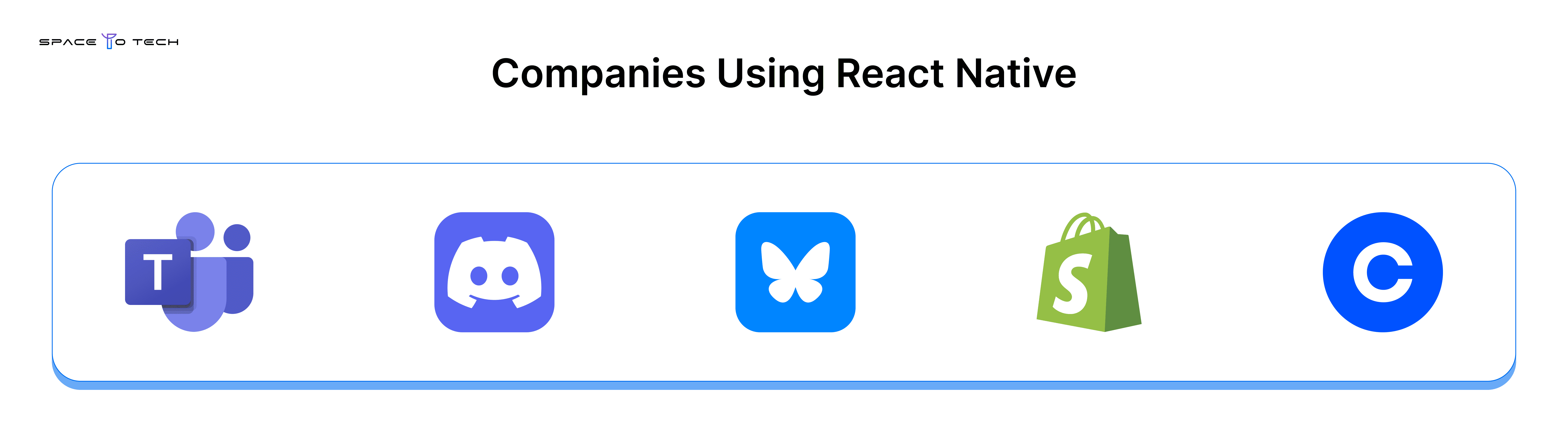
Coinbase and Bluesky both run production React Native applications, handling financial transactions and social feeds respectively.
Native Capabilities Supported by React Native
React Native supports every capability a typical business app requires: Push Notifications (Firebase/APNs), Deep Linking (universal links), In-App Purchases (react-native-iap or RevenueCat), Camera (Expo Camera), Biometrics (Face ID/Touch ID via react-native-biometrics), Offline Storage (WatermelonDB, SQLite), Maps (react-native-maps), and Bluetooth/NFC via community modules.
How React Native Works?
Architecture Overview
React Native architecture operates across three layers: a JavaScript layer where application logic lives, a bridge or JSI layer that handles communication, and a native layer where OS components render. Understanding this model matters for evaluating performance characteristics and what "cross-platform" actually means in practice.
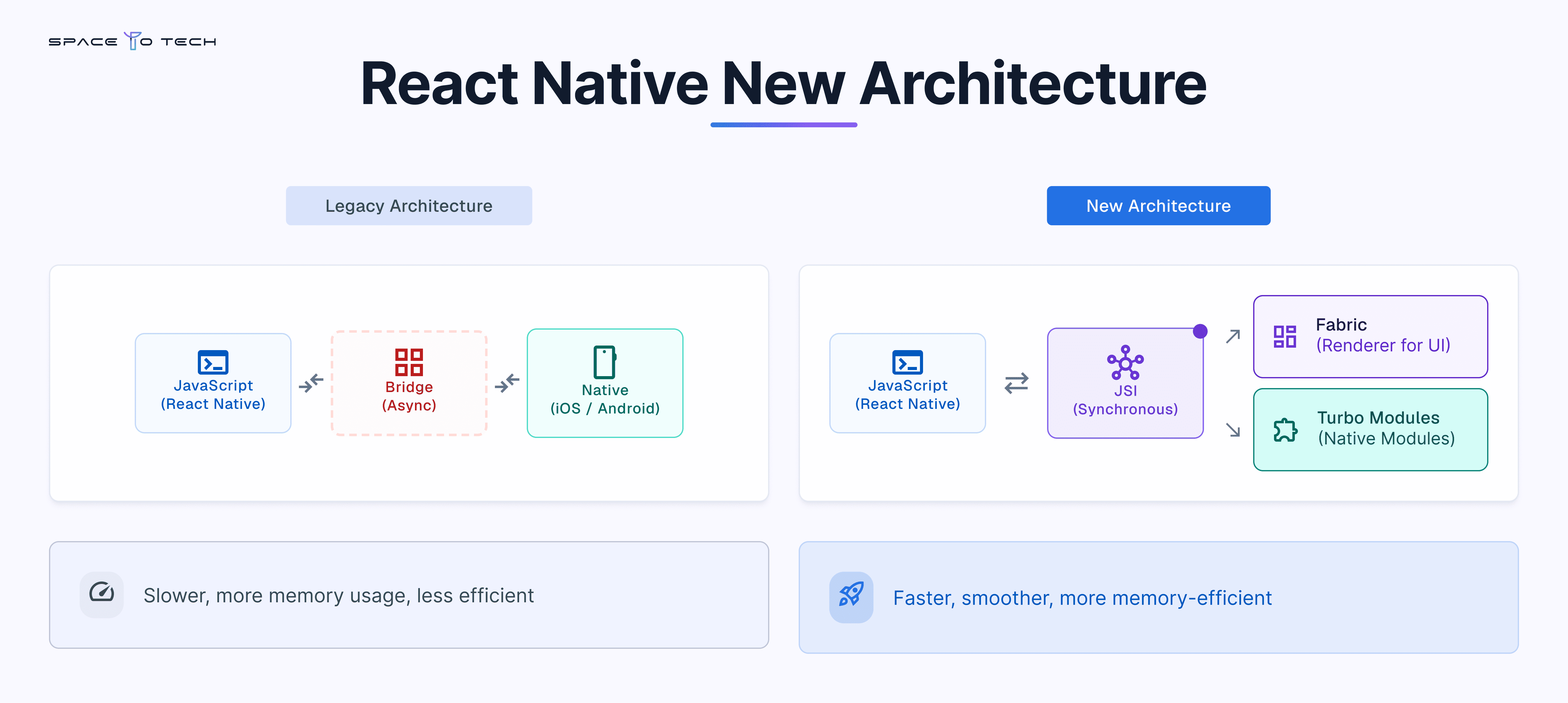
React Native Bridge vs JSI
The old Bridge communicated asynchronously, serialising data to JSON on every call — a bottleneck for animations and frequent interactions. JSI (JavaScript Interface) replaces this with synchronous, direct references to native objects, eliminating serialisation overhead. The React Native runtime result: faster animations, lower latency on interactions, and a smaller memory footprint. Native code access is now synchronous rather than queued. React Native libraries built on JSI can call native functions directly without round-trip overhead.
React Native New Architecture
What is the New Architecture?
The React Native new architecture replaces the async Bridge with JSI (synchronous), introduces the Fabric renderer for UI, and replaces Native Modules with Turbo Modules. Stable since React Native 0.74 (2024), the React Native new architecture directly benefits the business: apps built on it are faster, smoother, and more memory-efficient than legacy equivalents. This is not a theoretical improvement — it is measurable in production.
JSI, Fabric, Turbo Modules, Hermes, Nitro Modules
React Native JSI gives JavaScript direct references to C++ objects, bypassing JSON serialisation. React Native Fabric moves UI management to the native thread, enabling synchronous layout and reliable animations. React Native Turbo Modules load lazily and integrate tightly with TypeScript for type safety. The React Native Hermes engine pre-compiles JavaScript to bytecode at build time, dramatically reducing cold start time. Nitro Modules (2025) are the next-generation module system with near-zero overhead — signalling active ecosystem evolution beyond what competitors can currently match.
Migration Considerations
Teams migrating from the legacy architecture should audit third-party library compatibility before upgrading. This is no longer a future consideration—React Native 0.82 permanently removed the legacy Bridge, meaning applications still running on pre-0.82 versions should plan a structured migration to remain aligned with the supported architecture. Most major libraries have already adopted the New Architecture, although some community-maintained packages may still require compatibility checks.
Migration timeline:
- React Native 0.76 — New Architecture became the default for new projects.
- React Native 0.81 / Expo SDK 54 — Final releases providing a legacy interoperability path.
- React Native 0.82 — The legacy Bridge was permanently removed, and newArchEnabled=false is no longer supported.
- React Native 0.86 — React Native is fully bridgeless by default, with stricter Codegen-generated TypeScript support.
Most migrations take 2–8 weeks, depending on the amount of custom native code and third-party dependencies. For a complete migration checklist, compatibility audit, and step-by-step implementation strategy, read our complete migration checklist.
Key Features of React Native
Cross-Platform Development
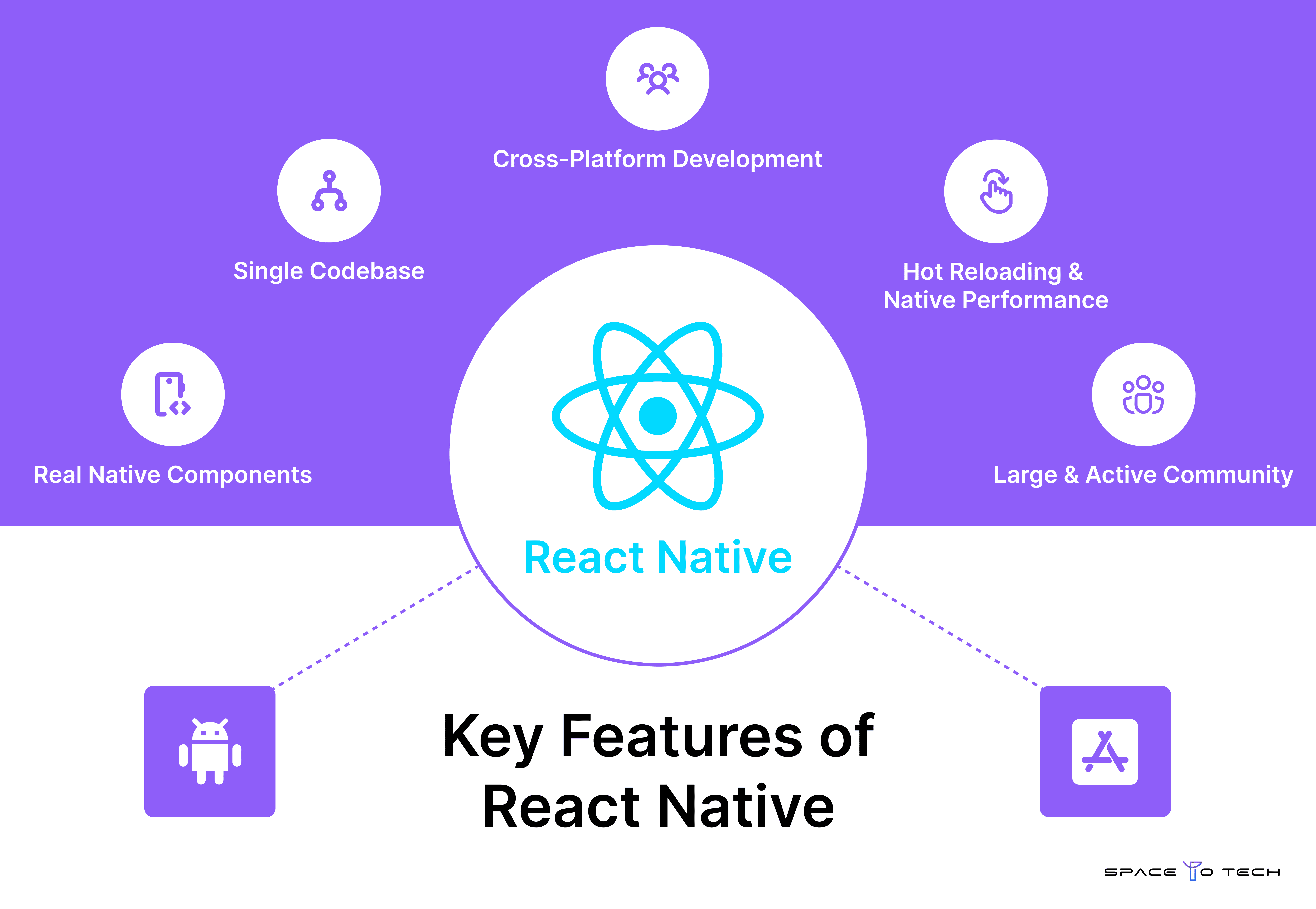
Cross-platform development with React Native means one team, one codebase, both platforms simultaneously. The business translation: one development cycle, not two. Cross-platform development at this level of native fidelity — real native components, not a WebView — was not viable before React Native at this cost point.
Single Codebase
The single codebase advantage compounds. Every feature you add, you add once. Every bug you fix, you fix once. Over a two-year product lifecycle, the single codebase model reduces maintenance overhead by 40–60% compared to parallel native teams. Approximately 80–90% of code is shared across platforms in a well-structured React Native project.
Hot Reloading & Native Performance
Fast Refresh lets developers see code changes reflected in a running app within seconds without losing state — compressing design-to-implementation feedback loops. Native performance in React Native is genuine for the vast majority of business applications: dashboards, eCommerce flows, booking systems, social feeds, logistics tools. The performance ceiling is below fully native Swift or Kotlin only for graphically intensive use cases that represent a small minority of business apps. Faster development is a downstream effect of both Fast Refresh and the large active community that maintains the ecosystem.
Benefits of React Native App Development
Faster Time-to-Market
The benefits of React Native app development start with speed. A React Native mobile app development project ships to both iOS and Android simultaneously — compressing two sequential native launches into one. For most product teams, this means 30–50% faster time-to-market.
Reduced Cost and Easier Maintenance
One codebase requires one team. Compared to separate iOS and Android engineers, a React Native mobile development team delivers cost savings of 30–40% on initial development and more as maintenance compounds. A single JavaScript codebase is a single place to fix bugs, update dependencies, and iterate on features. Benefits of React Native are most pronounced over multi-year product lifespans where the maintenance differential becomes the dominant cost factor.
Scalability and Community Support
React Native scales as a product grows through architecture patterns (Clean Architecture, feature modules) that support large codebases with multiple teams. The underlying infrastructure scales independently. Community support from Meta, Microsoft, and Shopify — all active contributors — gives React Native a lower abandonment risk than smaller ecosystems. The JavaScript talent pool is the largest in software development globally, which makes hiring React Native developers faster and cheaper than Dart (Flutter) specialists. Mobile applications of every scale have been shipped on React Native — the framework is not the constraint.
Advantages and Disadvantages of React Native
Advantages
- Single codebase reduces cost across both platforms
- Large JS talent pool lowers hiring cost and time-to-hire
- Fast Refresh accelerates development iteration
- Strong institutional backing from Meta, Microsoft, and Shopify
- Expo provides a managed workflow ideal for MVPs
- Native performance sufficient for 95%+ of business application use cases
Disadvantages
- Not ideal for graphically intensive applications (real-time 3D, heavy AR/VR)
- New Architecture migration still in progress for some older community libraries
- Debugging across two platforms adds complexity vs single-platform native
- Major version upgrades can be disruptive for projects with many native module dependencies
When React Native is Not the Right Choice
Real-time 3D games (use Unity), heavy AR/VR applications requiring continuous 120fps rendering, apps that depend entirely on platform-specific OS behaviours with no cross-platform equivalent, and very simple applications where a Progressive Web App would remove the app store overhead entirely. Native performance is the deciding factor — for the specific minority of apps where it genuinely matters, native wins.
Is React Native Still Worth It in 2026?
Is React Native Dying? — Addressing the Myth
Is React Native dying? No. Meta shipped the New Architecture (stable 2024). Turbo Modules are in production. Nitro Modules arrived in 2025. Shopify, Discord, and Microsoft Teams have not announced re-writes. The Stack Overflow 2024 Developer Survey shows stable developer adoption. The 'dying' narrative conflates the legitimate performance criticisms of the legacy architecture with the health of the framework itself — they are different things. Is React Native worth it in 2026? For cross-platform business applications in JavaScript teams, consistently yes.
Future Outlook
React Native is actively investable for a 3–5 year product horizon. The open-source MIT licence, institutional contributors, and community size mean the framework is not dependent on a single vendor's strategy. The React Native framework has overcome its most significant technical criticism (Bridge performance) with the New Architecture. Long-term support risk is lower than most alternatives. The future of React Native is an active, evolving platform — not a legacy framework being maintained until something replaces it.
React Native vs Other Technologies
React Native vs Flutter
React Native vs Flutter is the most common technology comparison in cross-platform app development in 2026.
React Native vs Flutter performance is genuinely close in 2026. React Native vs Flutter verdict: choose React Native if your team knows JavaScript; choose Flutter if pixel-level visual consistency matters more than talent pool access. React Native vs Flutter 2026 is not a clear win for either — it is a context-dependent decision.
React Native vs Native Development
React Native vs native development verdict: React Native vs Swift and React Native vs Kotlin comparisons both favour native on raw performance ceiling, but the cost and maintenance differential makes native the right choice only for that specific minority of apps where performance ceiling matters.
Expo vs React Native CLI
Expo vs React Native CLI: Expo is not a limitation — it is a productivity choice. Expo Router is the dominant navigation solution for React Native projects in 2026. Use CLI only when you have a native module requirement Expo's ecosystem does not cover.
Technology Comparison Matrix
Business Case for React Native
The ROI on a React Native mobile app development project versus separate native builds comes from three sources: lower initial development cost (30–50% fewer developer hours), faster time-to-market (one launch cycle instead of two), and lower ongoing maintenance cost. Over three years, the cost savings vs parallel native teams typically exceeds 50%.
A concrete example: a mid-complexity app requiring 2,500 development hours in React Native would require 4,000–4,500 hours as separate native builds. At $35/hour blended India rate, that is $87,500 versus $140,000–$157,500 — a 37–44% saving on initial build alone.
React Native for startups specifically: the single codebase means a smaller team, the JavaScript talent pool means easier hiring, and Expo's managed workflow means the fastest path to app store submission. The most common startup mistake is over-engineering the MVP architecture — clean architecture and monorepo structures are correct at scale, not on week one.
React Native App Development for Startups
React Native app development for startups solves a specific constraint: limited runway and the need to prove product-market fit on both iOS and Android before a second funding round. General mobile app development for two native platforms means two teams and two timelines; cross platform development with React Native means a smaller founding engineering team, faster development on user feedback, and a materially lower burn rate during the validation phase — without giving up a native-quality user experience. For a founder comparing native app development against a shared codebase, the math rarely favours building twice before the product is even validated.
Best Startup Use Cases for React Native
- SaaS startups: A React Native companion app extends an existing web platform to mobile without a second engineering team — shared business logic, faster feature parity across web and mobile.
- FinTech startups: Digital banking, budgeting, and investment apps benefit from Expo's fast MVP path combined with react-native-keychain for secure token storage and biometric authentication from day one.
- Marketplace startups: Buyer-seller platforms with real-time messaging and payment escrow ship faster on a shared codebase, since both sides of the marketplace often need near-identical app shells.
- Health and wellness startups: Telemedicine, fitness, and nutrition apps use React Native to reach iOS and Android simultaneously — important when patient or user acquisition cost punishes a staggered platform launch.
- eCommerce startups: Mobile shopping experiences ship without a separate native team, using Expo + Stripe + React Query as a proven starter stack (see the Technology Stack section above).
When React Native Fits a Startup — and When to Reconsider
The most common mistake at this stage is not the framework choice — it is over-engineering the MVP architecture. Clean Architecture and monorepo structures are correct once a startup has product-market fit and a second engineering hire; on week one, they add schedule risk without a corresponding benefit. Get a validated MVP live first, then invest in the architecture patterns covered earlier in this guide as the team and codebase grow.
React Native App Development Process
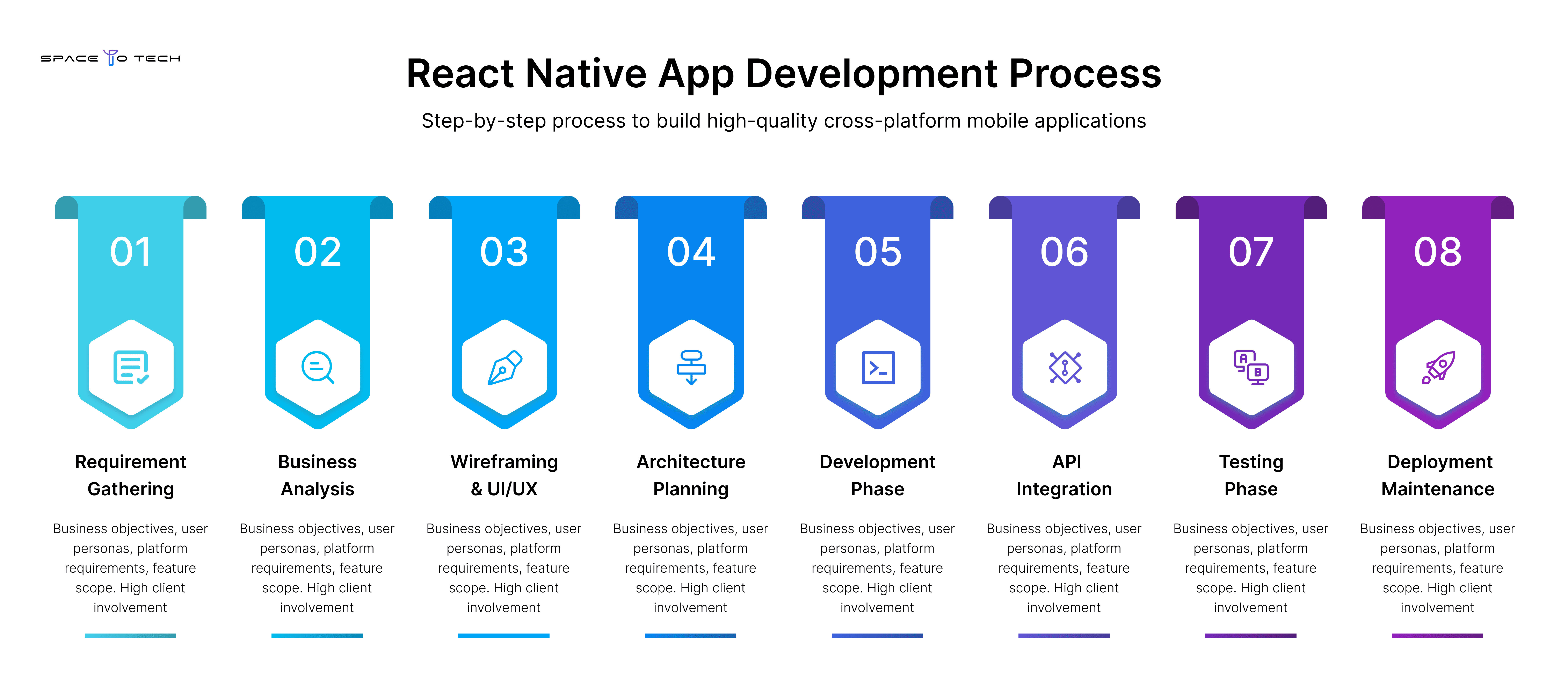
The React Native development process for a business application follows eight stages. The development process surprises are almost always process surprises, not technical ones — which is why understanding the lifecycle before kickoff matters.
Stage 1 — Requirement Gathering: Business objectives, user personas, platform requirements, feature scope. High client involvement — decisions here determine everything downstream.
Stage 2 — Business Analysis: Technical feasibility, integration mapping, third-party API requirements. Output: scoped requirements document.
Stage 3 — Wireframing & UI/UX Design: Low-fidelity flows, then high-fidelity Figma screens. Prototypes tested before development begins, preventing expensive UI rework during implementation.
Stage 4 — Architecture Planning: State management approach, navigation library, data layer design, backend integration contracts. The React Native development process decisions made here determine long-term maintainability. Skipping this step is the single most common source of expensive refactoring.
Stage 5 — Development: Two-week sprints, working builds at each sprint end, sprint reviews with the client. Real running software every two weeks — not Figma files representing theoretical progress.
Stage 6 — API Integration: Third-party services, payment SDKs, authentication providers, backend APIs. Integration testing runs in this phase.
Stage 7 — Testing: Unit, integration, device matrix testing (real devices, not just simulators), performance profiling, and User Acceptance Testing with the client team.
Stage 8 — Deployment & Maintenance: App Store and Play Store submission, post-launch monitoring, agreed maintenance SLA. React Native maintenance begins at launch, not when something breaks.
From Idea to App Store: What Building a React Native App Involves
For a founder who has never watched a mobile build happen, it helps to know what “developing the app” actually involves week to week. After architecture planning, developers begin creating React Native screens one user journey at a time — each app screen built, wired to real data, and reviewed before the next one starts. Native code is only touched directly when a feature needs something Expo's managed modules do not cover, such as a specialised sensor or a legacy SDK; most business features are built entirely in JavaScript and TypeScript, rendering as genuine native iOS app and Android native components. Toward the end of the build, attention shifts to the details non-developers notice first: the app icon, splash screen, store listing copy, and screenshots. This is also when initial app setup for both stores — certificates, provisioning profiles, and Play Console configuration — needs to be complete, since store review adds its own timeline on top of development.
App Store & Play Store Submission Checklist
- Code signing certificates configured (iOS: Distribution certificate + provisioning profile)
- iOS privacy manifest completed (required for iOS 17+)
- Android App Bundle configured for Play Store (not APK)
- All metadata: descriptions, screenshots for all required device sizes, privacy policy URL
- Age rating questionnaire completed on both platforms
- Hermes enabled and production build tested on real devices
- Push notification entitlements configured and tested end-to-end
React Native Technology Stack
Tech Stack by App Type:
First 90 Days Post-Launch
Launch creates operational work that should have a named owner before app store submission, not after:
- Crash and error monitoring (Sentry) reviewed on a defined cadence
- User feedback and support escalation routed to a specific owner
- Analytics reviewed against the success metrics set during discovery
- A defined process for urgent hotfixes versus scheduled feature releases
- React Native and dependency upgrades planned rather than reactive
A useful first-90-days plan separates urgent reliability work from product improvement — and defines which early metrics justify the next round of investment.
React Native App Development Cost
Building a React Native app development cost typically ranges between $15,000 and $300,000+ depending on complexity, features, and team location. Here is a realistic breakdown.
React Native app development cost is driven by: app complexity (number of screens, user roles, business logic depth), project scope (third-party integrations), custom UI/UX requirements, backend complexity, testing scope, and team location. Development costs vary 3–4x between US and India teams for equivalent output.
Regional Cost Comparison:
Hidden costs that belong in the budget: Apple Developer Program ($99/year), Google Play Console ($25 one-time), third-party API subscriptions (Stripe, Twilio, SendGrid), Sentry for monitoring ($20–$200/month), and EAS Build for OTA updates (free tier, then $99/month for production volume). These maintenance costs should be planned before launch, not discovered after.
Cost saving vs native development: a 2,500-hour React Native app development cost replaces approximately 4,000–4,500 hours of parallel native development costs — a 37–44% saving on initial build, compounding further over the maintenance lifecycle.
Reducing React Native App Development Cost
Five levers reliably bring the number down without cutting quality:
- Start with an MVP scope — validate the core journey before funding secondary features.
- Default to Expo managed workflow — it removes native build toolchain costs unless a specific module requires the CLI.
- Fix requirements before architecture planning — scope changes mid-sprint are the most common source of cost overrun.
- Phase features instead of building the full roadmap pre-launch — ship, measure, then invest based on real usage data.
- Avoid custom native modules unless Expo's ecosystem genuinely does not cover the requirement — each one adds ongoing maintenance cost.
React Native App Development Timeline
A React Native app development timeline varies by scope:
- React Native MVP timeline: 8–14 weeks from kickoff to app store submission
- Startup application: 16–24 weeks
- Enterprise application: 6–18 months
Factors affecting React Native app development timeline: Expo managed workflow compresses setup. Pre-built component libraries save UI time. Existing backend APIs remove a major workload. Timeline extension comes from: custom native modules, backend that does not yet exist, complex legacy API integrations, and scope changes mid-sprint.
The most reliable way to compress a React Native app development timeline is to complete requirements and architecture planning before development begins. Discovery is schedule protection, not overhead.
React Native Team Structure
Outsourcing to a team like SpaceToTech, a best React Native app development agency, makes sense when you do not have React Native expertise in-house and the hiring timeline exceeds the project timeline, or when you need a full team (design, frontend, backend, and QA) without the overhead of assembling one.
React Native App Scalability Guide
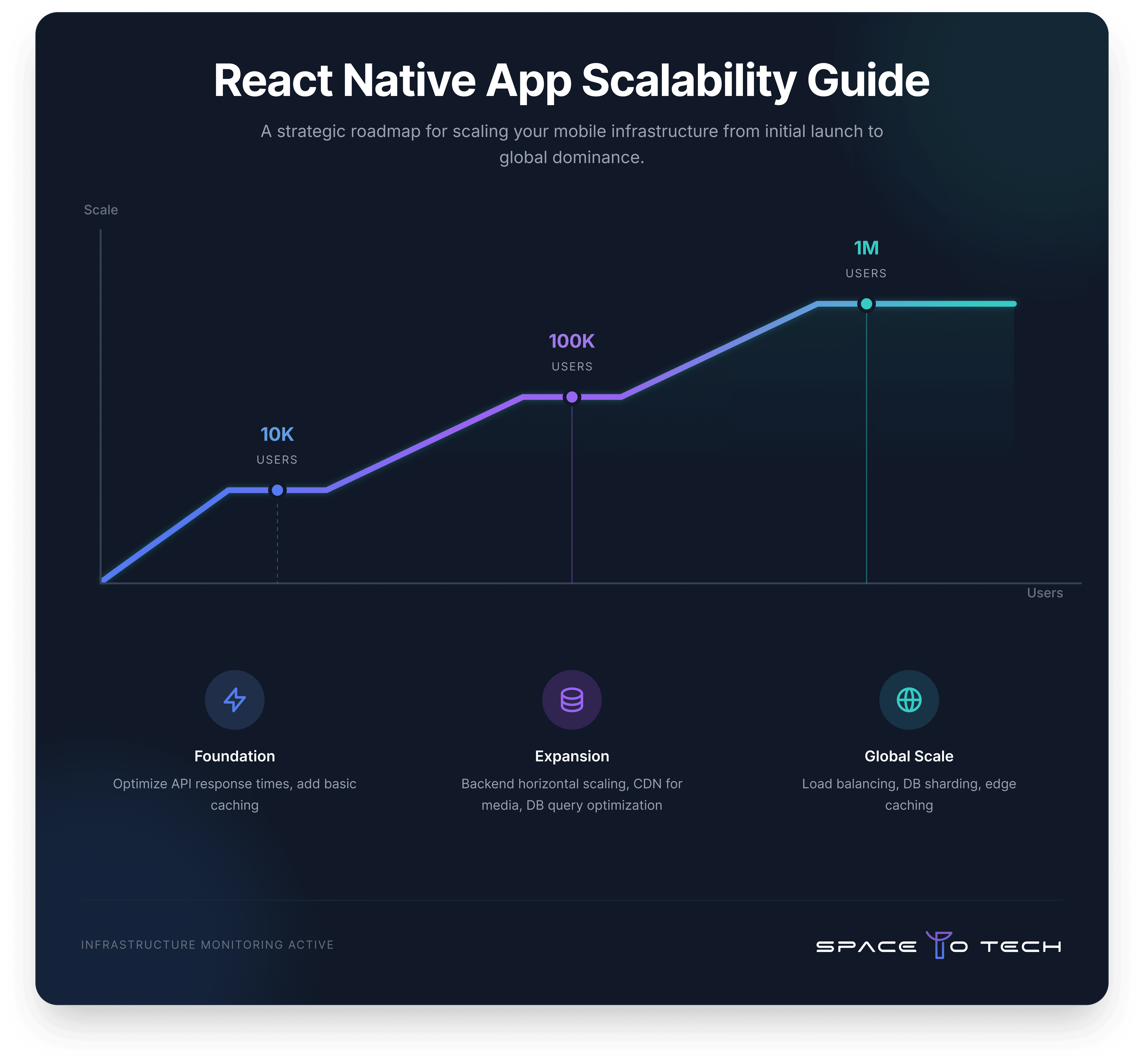 React Native scalability as a client-side concern is minimal — the framework handles any UI complexity. Scaling to users is a backend and infrastructure concern:
- 10K users: Optimise API response times, add basic caching. No React Native changes required.
- 100K users: Backend horizontal scaling, CDN for media, database query optimisation.
- 1M users: Load balancing, database sharding, edge caching. Still no React Native changes required.
React Native scalability as a codebase concern applies to large teams: 100+ screens and 10+ developers require architectural discipline — Clean Architecture, feature modules, strict component boundaries — to remain maintainable. SpaceToTech establishes these patterns at project start, not when the codebase becomes unmanageable.
Backend Ownership Callout
Worth stating plainly: React Native reduces duplicated UI work across iOS and Android — it does not remove backend complexity. API contract ownership, authentication, data synchronisation, and release operations still need a clear owner regardless of frontend framework. Most React Native project delays trace back to unclear backend ownership, not the framework itself.
React Native Security Checklist
React Native security starts with one assumption: the client device is untrusted. Every API call, stored credential, and authentication token should be treated as potentially accessible to someone with physical device access.
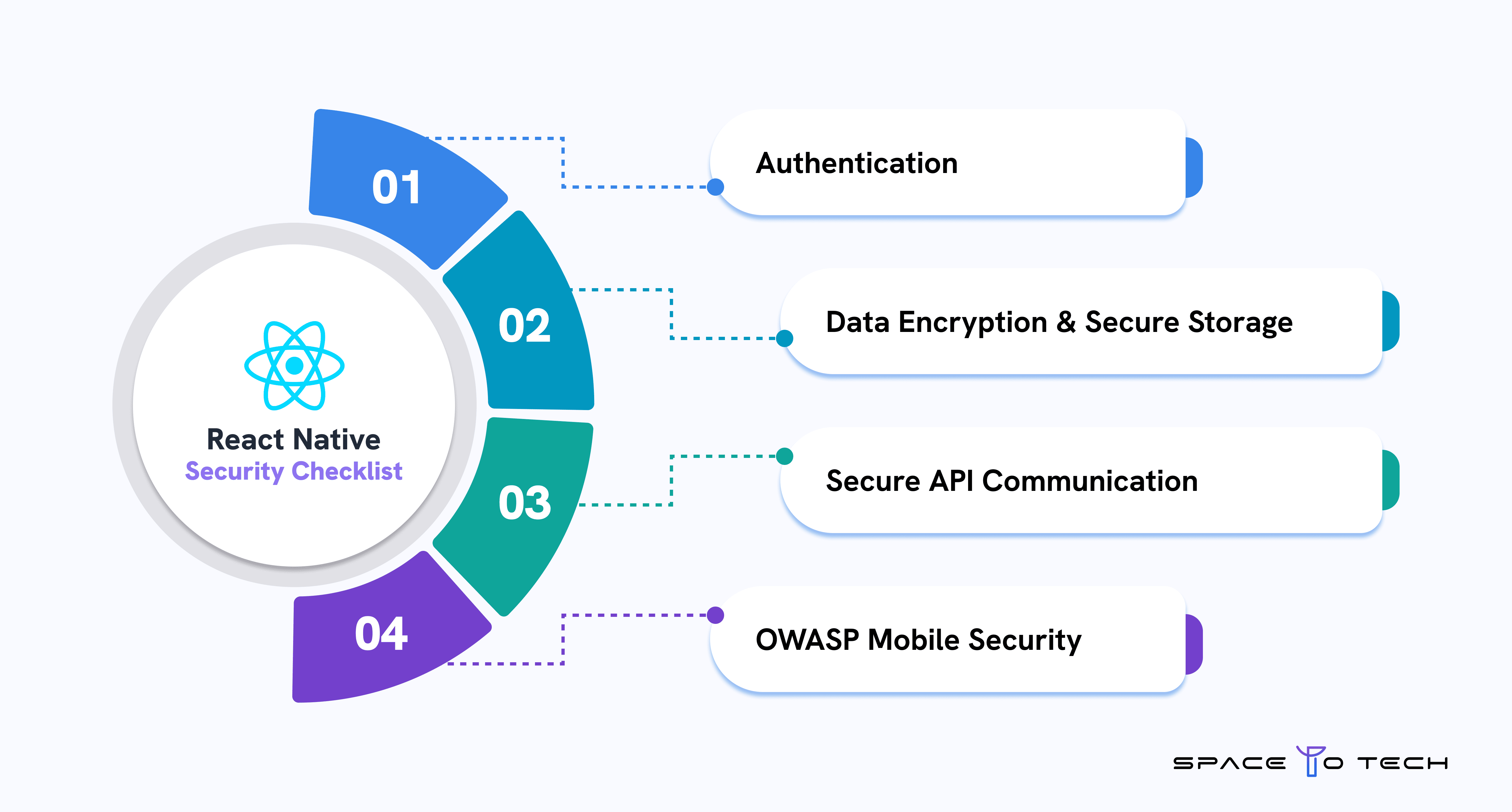
Authentication
OAuth 2.0 for third-party auth, biometric authentication via react-native-biometrics, MFA for high-security contexts. The authentication process detail most projects get wrong: never store tokens in AsyncStorage — it is unencrypted. Use react-native-keychain, which wraps iOS Keychain and Android Keystore. React Native security failures in production are almost always storage and credential handling failures.
Data Encryption & Secure Storage
TLS 1.3 for all data in transit. SSL pinning against MITM attacks via react-native-ssl-pinning. Insecure data storage — storing sensitive data in AsyncStorage or plain text files — is the most common React Native security vulnerability in shipped apps. Encrypt data at rest using platform keystore integration. Rotate encryption keys on a defined schedule for compliance-sensitive applications.
Secure API Communication
Never hardcode an API key in the application bundle — API keys in React Native source code are extractable from the compiled binary. Use a backend proxy: the mobile app authenticates to your backend, which holds the third-party API key and makes the outbound call. Validate all inputs server-side. Implement rate limiting. Use short-lived JWTs. User data handling should be mapped to GDPR, HIPAA, or PCI-DSS requirements depending on application domain. Security risks at the API layer are preventable through architecture — they are not React Native-specific vulnerabilities.
OWASP Mobile Security
The OWASP Mobile Top 10 is the standard reference for mobile security risks. Most relevant for React Native: M1 (Improper Credential Usage — hardcoded credentials), M2 (Inadequate Supply Chain Security — unvetted npm packages), M4 (Insufficient Input Validation), and M8 (Security Misconfiguration). A React Native security review against this checklist before launch is not optional for any application handling financial, health, or personal data.
React Native Performance Optimization
React Native performance optimization is most impactful in three areas: re-render reduction, memory management, and monitoring.
Reducing Re-renders
The most common performance bottlenecks in React Native: unnecessary re-renders triggered by parent state changes. Use React.memo to prevent re-renders of components whose props have not changed. Use useMemo for expensive computed values. Use useCallback for functions passed as props. These three techniques resolve the majority of React Native performance optimization issues in list-heavy interfaces. The JavaScript thread is single-threaded — blocking it with synchronous operations causes frame drops that no UI change can compensate for.
Image Optimization and Memory Management
The FastImage library replaces the default Image component with a cached, performance-optimised version. Resize images server-side — a 2MB image rendered in a 100x100dp thumbnail is a preventable React Native performance optimization failure. Memory usage from unoptimised images is the most common cause of out-of-memory crashes on low-end Android. Startup time is reduced through Hermes bytecode pre-compilation (automatic in React Native 0.70+) and lazy loading of off-screen content.
State Management and Monitoring
State management architecture directly impacts performance. Co-locate state close to components that use it — avoid placing frequently-updated state in global stores that trigger wide re-renders. React Query handles server state caching and prevents redundant API calls. Performance monitoring in development uses Flipper for bridge call inspection and state debugging. In production, Sentry captures performance bottlenecks, startup time degradation, and slow renders on real user devices — which behave differently from development simulators. Set up Sentry before launch. React Native performance optimization problems that only appear at production load on real low-end hardware require production monitoring to catch.
React Native App Size and Performance
App size is a measurable ranking and conversion factor on both app stores — a bloated build increases install abandonment on slower connections, particularly on lower-end Android devices. For a large app with many screens, Hermes bytecode pre-compilation, unused-dependency pruning, and image compression are the three levers with the biggest impact on final app size. Keep an inventory of every native platform dependency added during development; each one adds binary weight, and libraries adopted for a single React Native component early in a project are often forgotten and never removed. Reviewing app size before every release, not just before launch, keeps a growing codebase from quietly becoming a large app with a poor cold-start time.
React Native Architecture Patterns
Clean Architecture
Clean architecture React Native separates the application into presentation (components), domain (business logic), and data (API calls, storage) layers. Business logic is decoupled from the UI framework — it can be tested without rendering components. Correct for teams of 3+ developers and projects with a 2+ year lifespan.
Modular Architecture
React Native modular architecture organises the codebase by feature modules (auth, payment, profile) rather than technical layer (components, hooks, services). Modules are self-contained. This scales well for large teams where different squads own different product areas. Combined with clean architecture React Native patterns, it supports codebases of 100+ screens without structural degradation.
MVVM and Monorepo
MVVM (Model-View-ViewModel) is common in enterprise React Native projects influenced by Angular or Swift UI patterns. A monorepo structure (Nx or Turborepo) enables code sharing between a React Native app and a React web app — useful when business logic, API clients, or design tokens should be consistent across platforms.
React Native Use Cases by Industry
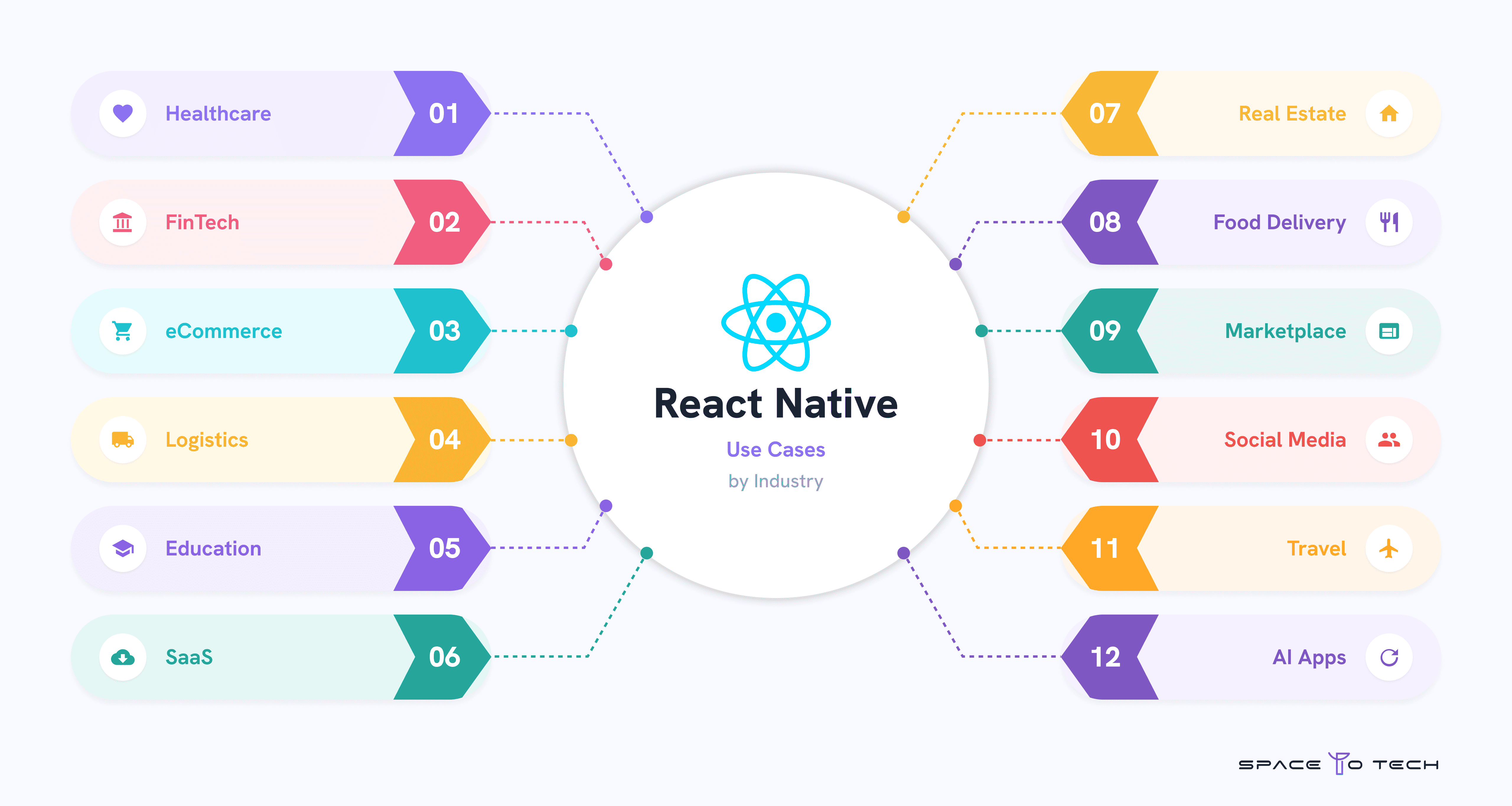
- Healthcare: Patient portals, HIPAA-aware data handling, EHR/FHIR integration, telemedicine via WebRTC
- FinTech: KYC onboarding, real-time transaction dashboards, biometric auth, PCI-DSS payment flows
- eCommerce: Product browsing performance on mid-range Android, in-app purchases, push notification re-engagement
- Logistics: Real-time GPS tracking, offline-first data sync for low-connectivity environments, barcode scanning
- Education: Adaptive bitrate video, offline content download, progress tracking, gamification
- SaaS: Subscription billing, multi-tenant data architecture, role-based access control
- Real Estate: Property listings, map integration, lead capture, virtual tour support
- Food Delivery: Real-time order tracking, driver location updates, payment processing
- Marketplace: Buyer-seller workflows, payment escrow, real-time messaging
- Social Media: WebSocket-based feeds, media upload with client-side compression, notification handling
- Travel: Booking engine integration, offline itinerary access, multi-currency payment
- AI Apps: OpenAI/Anthropic integration, voice interfaces, recommendation engines, on-device ML
React Native + AI Development
React Native AI development is one of the fastest-growing categories in mobile engineering in 2026.
AI Chatbots and Voice AI
React Native AI development for conversational interfaces uses the OpenAI or Anthropic API for the language model, with react-native-gifted-chat for the UI. The integration pattern: the mobile app sends messages to your backend, which holds the API key and makes the model call, then streams the response back. Never call AI APIs directly from the mobile client — API key exposure is the security failure mode when you do. Integrating AI voice features uses react-native-voice for speech-to-text input and ElevenLabs or Whisper for synthesis.
On-Device AI and Agentic Applications
TensorFlow Lite and Core ML enable mobile AI apps that run inference locally — no network call required — for image classification, on-device text processing, and gesture recognition. AI agents in mobile contexts — agents that navigate the app, call APIs, and take actions based on user intent — are achievable in 2026 with careful prompt engineering and tool calling architecture. The latency challenge (2–5 API round trips per action) is the primary constraint. AI development security considerations: prompt injection risks, API key exposure if calls are made client-side, and data privacy implications when user data is sent to third-party model APIs under GDPR or HIPAA.
React Native for Web
What is React Native Web?
React Native web (via react-native-web) allows React Native components to render in a browser. A View becomes a div, a Text becomes a span, enabling a single codebase that targets iOS, Android, and web.
React Native Web vs Next.js
Choose React Native web if you already have a React Native app and need a basic web companion without a separate codebase. Choose Next.js if the web experience is the primary product — Next.js has better SEO via server-side rendering, better web performance characteristics, and a larger web-specific tooling ecosystem. The two are not competing for the same use case; they solve different problems.
Best Tools for React Native Development
Expo — Managed workflow, removes native build toolchain complexity, includes OTA updates and a comprehensive module library. The right choice for the majority of projects.
React Native CLI — Full native layer control. Required only when Expo's modules do not cover a specific native requirement.
Firebase — Backend-as-a-service for real-time database, authentication, push notifications, and crash analytics. Fastest backend path for MVP projects.
Flipper — Development-time debugger. Inspects network requests, Redux state, and bridge calls. Not used in production.
Sentry — Production error and performance monitoring. Captures JavaScript crashes, native crashes, and slow renders with full stack traces. Configure before launch.
Fastlane — Automates code signing, building, and store submission. Reduces deployment to a single CLI command for teams shipping frequently.
React Native Statistics and Market Data (2026)
According to the Stack Overflow Developer Survey 2024, approximately 9.1% of professional developers use React Native actively, stable year-over-year. The JetBrains Developer Ecosystem Report 2024 shows React Native as the most-used cross-platform mobile framework among professional developers, with particularly strong adoption in the US, Germany, and India. Meta's public engineering blog confirms the New Architecture is enabled by default in new React Native projects since version 0.74 (2024), with Expo maintaining comparable adoption numbers among the managed workflow segment of the market.
React Native Project Planning Checklist
Business Requirements
- Core user personas and primary use cases defined
- Target platforms confirmed (iOS, Android, or both)
- All required third-party integrations listed
- App store accounts set up (Apple Developer, Google Play)
- MVP scope defined separately from full product scope
Technical Requirements
- Expo vs CLI decision made
- Backend API strategy confirmed
- Minimum iOS and Android version support defined
- Offline requirements defined
- Performance requirements defined (acceptable startup time, load time)
Security Requirements
- Authentication mechanism confirmed (OAuth, biometric)
- Sensitive data storage approach confirmed (no AsyncStorage for tokens)
- API key management strategy confirmed (no client-side storage)
- Compliance requirements identified (HIPAA, GDPR, PCI-DSS)
Launch Checklist
- Privacy policy URL live and linked in app store listings
- iOS privacy manifest completed
- All required screenshot sizes produced
- Age rating questionnaire completed on both stores
- Sentry crash monitoring configured and tested pre-launch
- Beta testing completed on real devices (TestFlight + Play Internal)
How to Choose a React Native Development Company
Most comparisons of React Native development companies start and end with a portfolio. That is not enough. A framework choice cannot compensate for unclear scope, weak backend ownership, or a vendor with no plan for what happens after launch. Before evaluating any agency — SpaceToTech included — use the framework below to separate genuine React Native application development capability from a portfolio page.
A React Native project is only as strong as the developers running it. The native framework itself is mature and well documented, but outcomes vary widely between teams — which is why the questions below focus on process and ownership, not just how many native mobile development projects a vendor lists on their website. The goal is to find react native developers, not just react native users of a template.
What to Ask Before You Sign
React Native–Specific Questions Worth Asking
- Who owns the backend API contracts, and how are breaking changes handled mid-project?
- Will the project use the New Architecture (JSI, Fabric, Turbo Modules) by default, and how is third-party library compatibility checked before it's adopted?
- What is the plan if a required feature needs a native module Expo does not cover?
- Who is on call for crash triage in the first 90 days after launch, and what is the response SLA?
- Will you receive full source code, signing keys, and store account access at handover — not just at contract end?
A vendor that answers these questions specifically, with named owners and defined processes, is demonstrating React Native development maturity that a portfolio alone cannot show. Building native apps that hold up in production — not just in a demo — depends more on this kind of platform development discipline than on any single technical choice. SpaceToTech's engagement models — Dedicated Developer, Team Augmentation, and Project-Based — are built to answer every question above before a contract is signed, not after a project stalls.
Why Choose SpaceToTech for React Native Development
Our Development Process
SpaceToTech, a React Native app development agency, starts its React Native app development process with a discovery and scoping phase before a line of application code is written — including requirements workshops, technical feasibility review, architecture decisions, and cost estimates. Development runs in two-week sprints, with working builds delivered at the end of each sprint. Clients see real, running software every two weeks, not Figma files representing theoretical progress. Direct developer access via Slack or Teams is standard, rather than routing communication through an account manager.
Industries We Serve
SpaceToTech builds React Native applications across healthcare, FinTech, logistics, eCommerce, SaaS, real estate, HR, EdTech, and enterprise tools. Each vertical has specific technical requirements — HIPAA for healthcare, PCI-DSS for payments, offline-first for logistics — addressed in the architecture phase, not discovered post-launch.
Engagement Models
Three models for React Native development: Dedicated Developer (one developer assigned exclusively to your project, not shared across client accounts), Team Augmentation (React Native developers added to your existing team for specific gaps or velocity), and Project-Based Engagement (full scope from architecture to handover). All three include sprint reviews, NDA, full codebase ownership by the client, and app store accounts retained by you throughout and after the engagement.
Explore Related React Native Development Resources
Explore these related guides to learn more about React Native frameworks, app development costs, security, migration, and choosing the right development team.