Most teams pick React Native for the obvious reason: one codebase, two platforms, faster shipping. Fewer teams stop to ask how the framework actually gets JavaScript to talk to native iOS and Android code underneath. That gap rarely matters until it does: a scroll that stutters, a cold start that feels heavier than it should, a third-party library that suddenly won't build. Almost every one of those problems traces back to architecture.
This guide breaks down how React Native's engine actually works in 2026, from the original Bridge to the JSI-powered New Architecture that has now fully replaced it. If you're evaluating React Native for a build, hiring for one, or trying to understand why your app behaves the way it does, this is the layer worth understanding. For the bigger picture on planning and building a full React Native product.
What Is React Native Architecture?
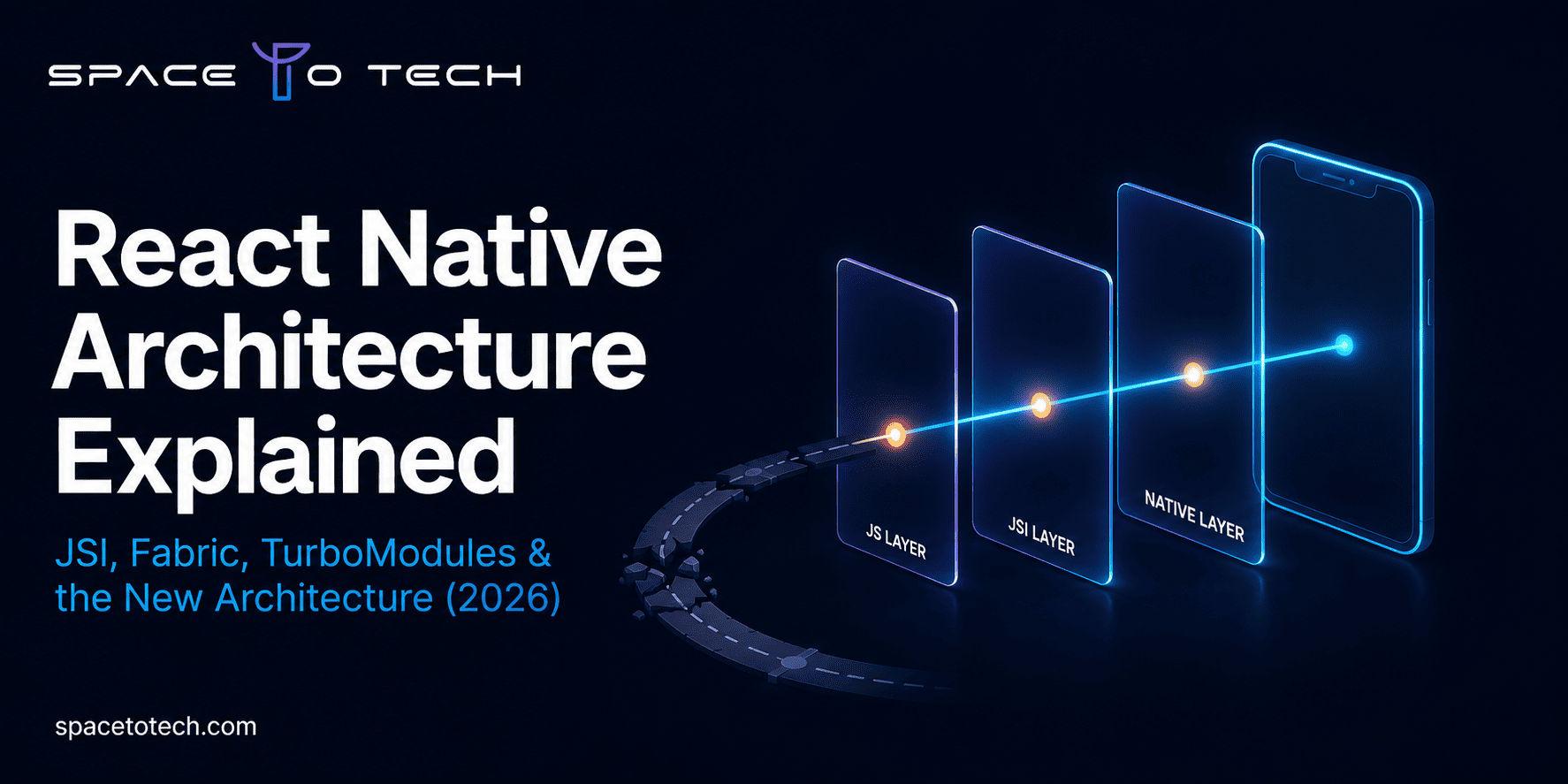
React Native architecture describes how JavaScript code you write communicates with the native iOS and Android layers that actually render pixels on screen, access the camera, or read from device storage. Conceptually, there are three layers: your JavaScript code and React components, a communication layer that passes instructions and data across the JS/native boundary, and the native layer itself, made of platform APIs and UI components.
How that middle layer works has changed dramatically since React Native launched in 2015. For a decade, it ran on something called the Bridge. As of 2026, the Bridge is gone entirely, replaced by a faster, synchronous system built on JSI. Understanding both versions, and why the switch happened, explains most of what makes a React Native app feel fast or feel sluggish.
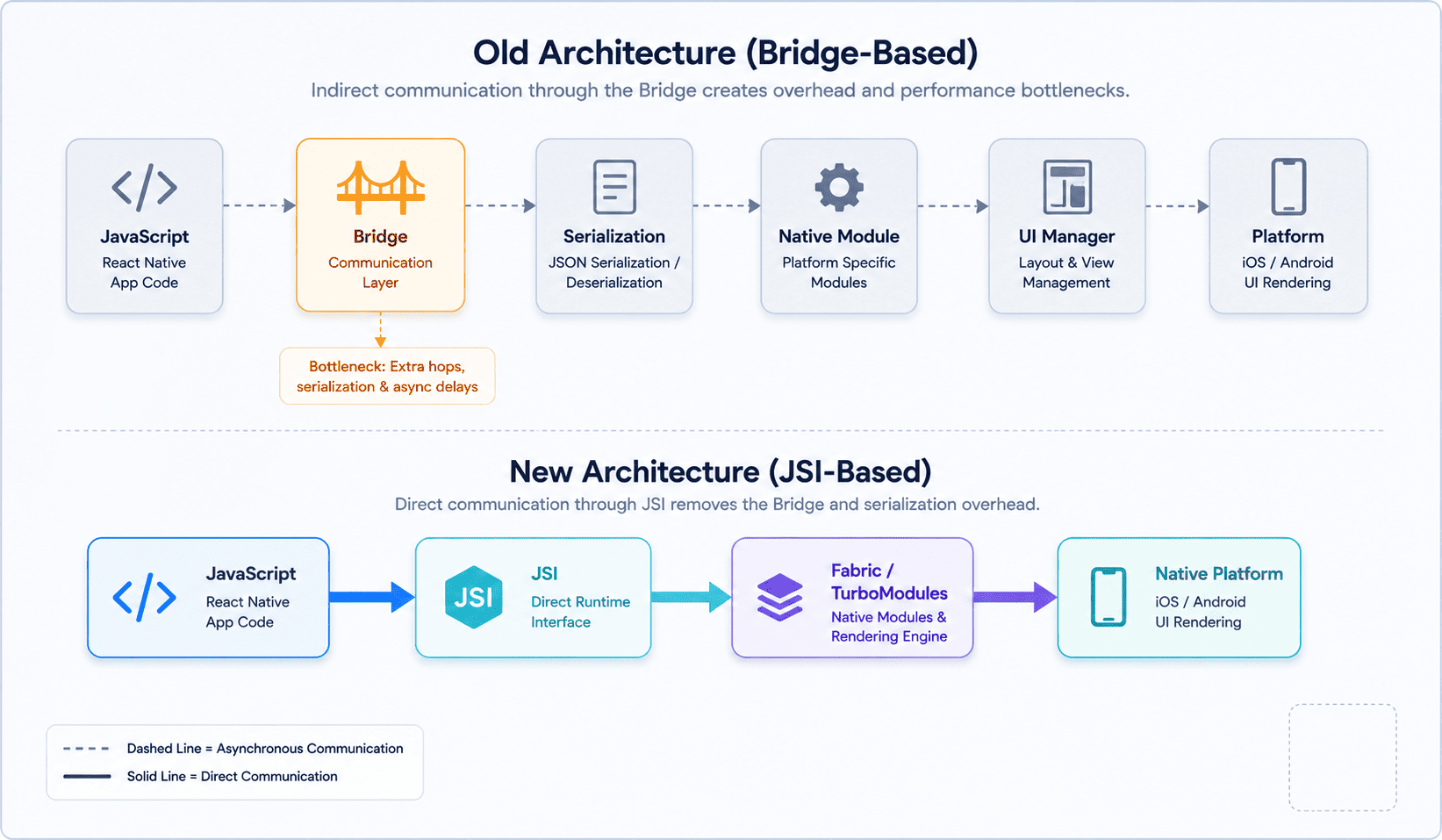
The Old Architecture: How the Bridge Worked (and Why It Broke Down)
The original React Native architecture ran on three separate threads: a JavaScript thread running your React code, a native or UI thread responsible for actually drawing views, and a shadow thread that calculated layout. None of these threads could talk to each other directly. Instead, every instruction passed through the Bridge, an asynchronous, JSON-serializing message queue.
Here's what happened, step by step, every time your code called setState(): React's reconciler diffed the virtual DOM on the JS thread, the UIManager generated a list of view mutations, those mutations were serialized into a JSON string, the JSON was posted to the async message queue, the native side deserialized it, the C++ shadow tree updated, Yoga calculated the flexbox layout, and finally the native view was drawn on screen. That's two full Bridge crossings just to update one piece of state.
For simple apps, this was invisible. For anything complex, it wasn't. A long list scrolling meant hundreds of these round trips per second, each one paying the serialization cost again. Animations dropped frames because the JS thread couldn't guarantee when the native side would actually receive an update. There was no way to measure a native view's layout synchronously, which made certain interactions, like a text input that needs to know its own height mid-render, awkward or impossible to build cleanly.
The Bridge worked well enough that companies like Shopify, Discord, and Microsoft Teams built serious production apps on it. But as those apps scaled, the Bridge's fundamental design became a ceiling the team couldn't build past. That's what the New Architecture was built to remove.
The New Architecture: JSI, Fabric, TurboModules & Codegen
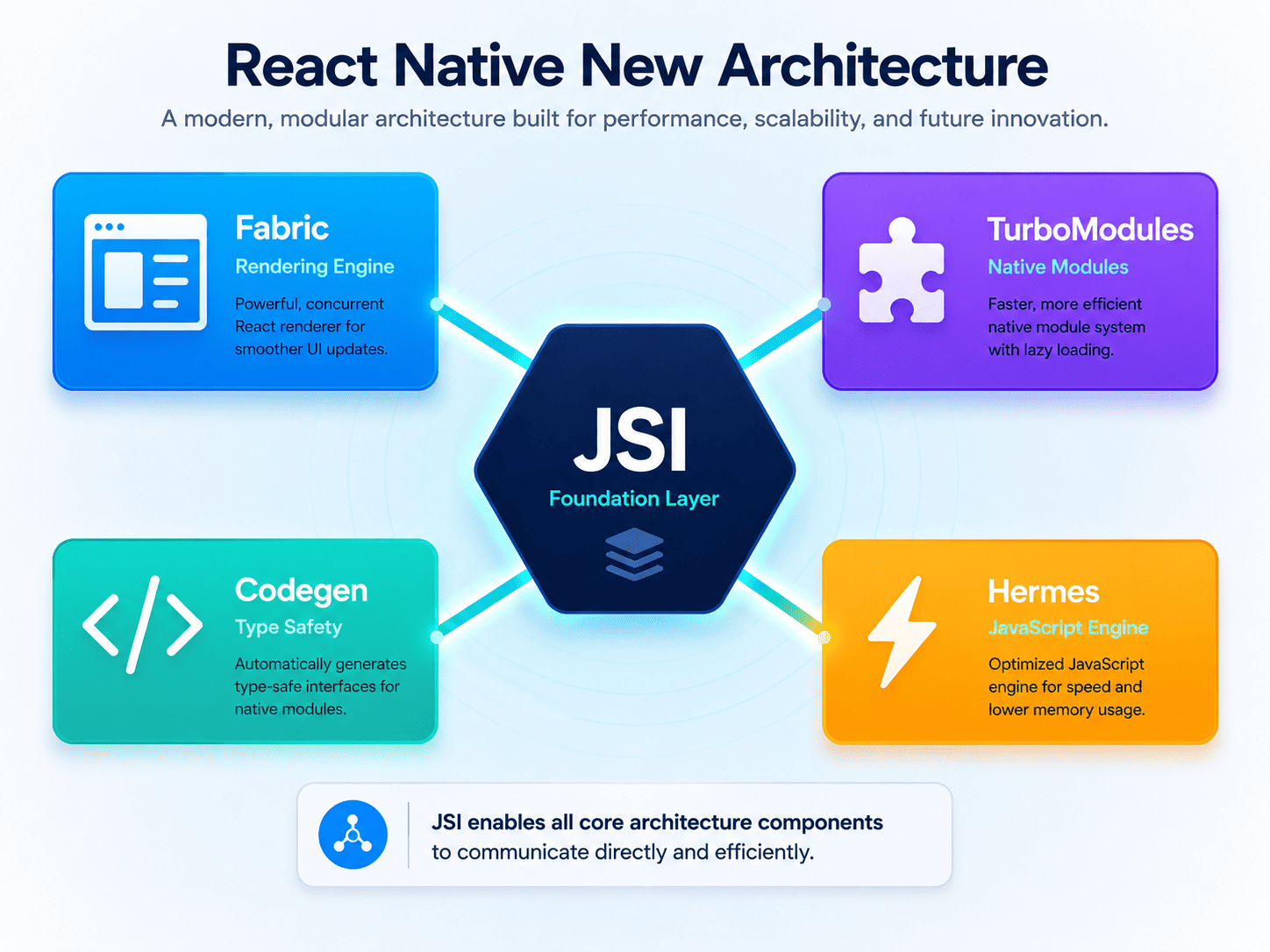
The New Architecture replaces the Bridge with four connected pieces: JSI, Fabric, TurboModules, and Codegen. Together, they eliminate the async JSON bridge and let JavaScript and native code communicate directly.
JSI (JavaScript Interface)
JSI is the foundation everything else is built on. It's a lightweight C++ layer that lets JavaScript hold a direct reference to a native object, and vice versa. There's no JSON to serialize, no message queue to wait on, and no guessing when a message will arrive. A JS function can call a native method synchronously and get a result back immediately, the same way it would call any other JavaScript function. This single change is what unlocked everything that followed.
Fabric Renderer & the Shadow Tree
Fabric replaces the old UIManager as React Native's renderer. It's built directly on JSI, which means layout can now be measured synchronously instead of waiting on an async round trip. Fabric maintains the shadow tree in C++ rather than passing it back and forth across the Bridge, and Yoga still handles the actual flexbox layout math on top of it. Because Fabric is JSI-based, it also supports React 18 features like Suspense and transitions, and it enables automatic batching, which reduces unnecessary re-renders during rapid state updates.
According to the official React Native architecture documentation, the New Architecture was built specifically to bring these concurrent rendering features to native apps.
TurboModules
TurboModules replace the old NativeModules system. Under the Bridge, every native module your app used, whether it was called on screen one or never at all, was loaded eagerly at app startup. TurboModules load lazily, only when JavaScript first references them. For an app with dozens of native integrations, that alone meaningfully cuts cold start time.
Codegen & Type Safety
Codegen reads TypeScript or Flow specification files and generates the native interface code, C++, Objective-C++, and Kotlin, automatically. If your native implementation returns the wrong type or drops a field the spec defines, the native build fails immediately instead of crashing in production weeks later. This moves an entire category of bugs from runtime to build time, something the old NativeModules system had no equivalent for.
Hermes Engine
Hermes is React Native's JavaScript engine, purpose-built for mobile. It compiles JavaScript to bytecode ahead of time rather than parsing and compiling on every app launch, which improves startup time and reduces memory usage. Under the New Architecture, Hermes isn't an optional performance toggle anymore. JSI depends on capabilities that only Hermes provides, which makes it a hard requirement rather than a recommendation.
The 2026 Update: The Legacy Bridge Is Now Fully Removed
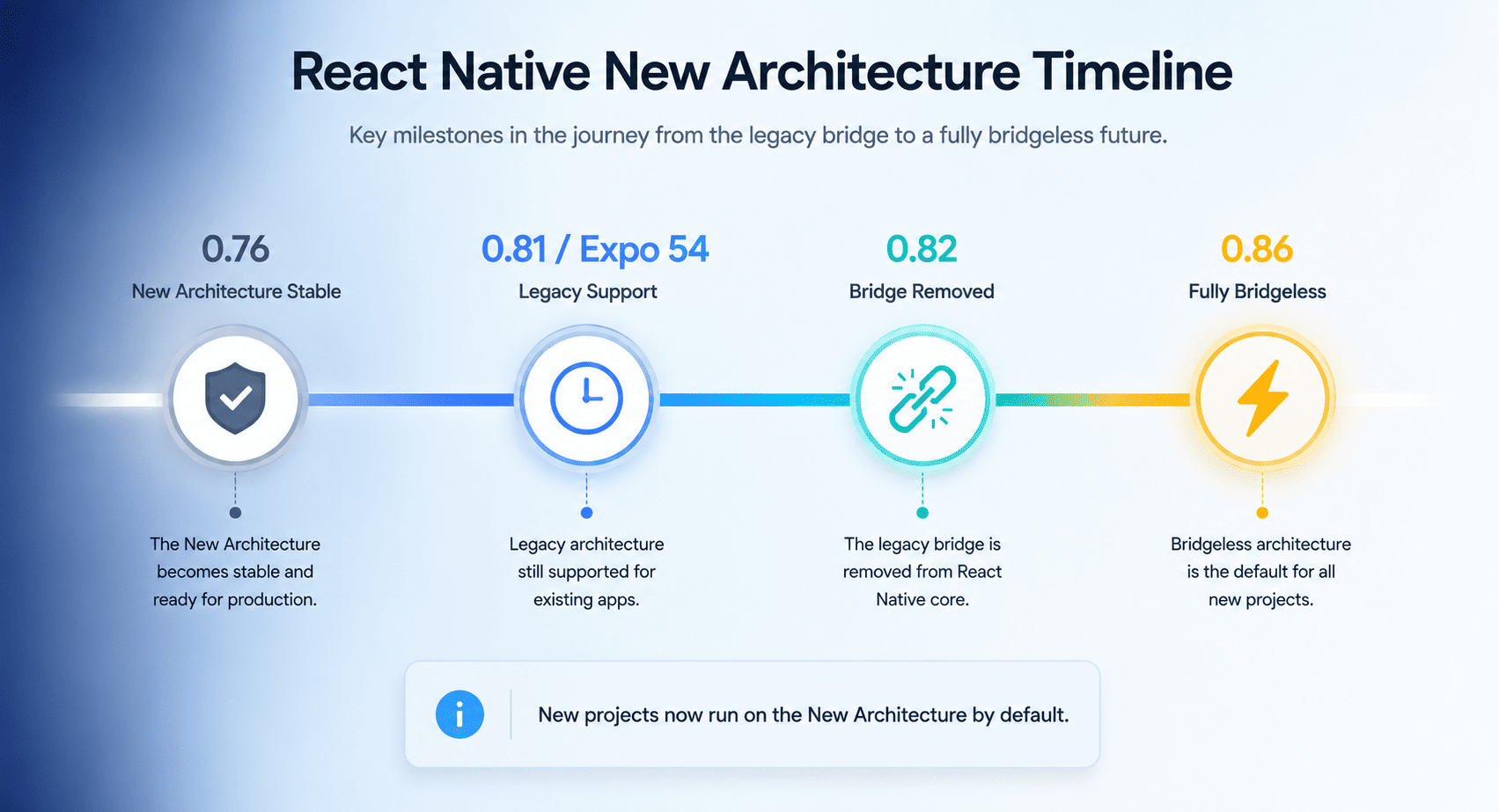
Most articles on this topic still describe the New Architecture as something React Native apps are “moving toward.” That's out of date. As of 2026, the transition is over.
React Native 0.76, released in late 2024, made the New Architecture the default for new projects. React Native 0.81 and Expo SDK 54 were the last versions offering a legacy interop path for apps that hadn't migrated yet. Then React Native 0.82 removed the old Bridge entirely. Setting newArchEnabled=false in your build configuration is now simply ignored, there's no path back to the legacy system. More recently, React Native 0.86, released in June 2026, went a step further: every new project starts fully bridgeless by default, with the Strict TypeScript API generating types directly from source code via Codegen rather than hand-maintained type definitions.
The practical implication is straightforward. Any team still running an app built before 0.82 is sitting on a hard upgrade ceiling, not a future decision. Any third-party library that hasn't migrated to support TurboModules and Fabric is now a genuine adoption risk, not a wait-and-see situation.
If you're planning a new build or evaluating an existing codebase in 2026, the New Architecture isn't a checkbox anymore. It's simply what React Native is, which is also why it's worth working with a team that builds on it by default rather than treating it as a migration project. Our React Native app development services start from the New Architecture as the baseline, not the destination.
How Data Moves Through the New Architecture
It's worth tracing the same setState() call from earlier, this time through JSI and Fabric, to see the actual difference. Your JSX describes an element tree in JavaScript. That tree is passed through JSI directly, with no serialization step, to update the C++ shadow tree. Yoga calculates the resulting layout on that same shadow tree. Fabric then mounts or updates the real native views to match, and the frame is drawn.
Compare that to the old flow: React reconciles, JSON is packed, the async queue delivers it, native deserializes, the shadow tree updates, Yoga runs, and only then does a view get drawn. The New Architecture removes two full serialization steps and the uncertainty of an async queue in between. That's the entire performance story in one comparison: fewer hops, no JSON, and layout that can be measured synchronously instead of guessed at.
Nitro Modules: The Next Layer Beyond TurboModules
Nitro Modules, introduced in 2025, push the same idea one step further than TurboModules. Where TurboModules still route through a defined native module interface, Nitro Modules generate near-zero-overhead JSI bindings directly, cutting out even more of the abstraction between JavaScript and native code. They're not yet the default the way Fabric and TurboModules are, but they're a strong signal of where the framework is heading: less abstraction, more direct native access, without giving up React Native's shared codebase model.
Code-Level Architecture Patterns
Runtime architecture is only half the picture. How you organize your own code matters just as much for a project's long-term health. Two patterns show up repeatedly in serious React Native codebases: Clean Architecture, which separates business logic from UI and framework code so your core logic doesn't depend on React Native itself, and Modular Architecture, which splits an app into self-contained feature modules that can be built, tested, and even reused independently. Both patterns become more valuable as a codebase grows past a handful of screens.
This is genuinely a topic on its own. For a full breakdown of Clean Architecture, Modular Architecture, and MVVM patterns for React Native, see our complete React Native app development guide, which covers folder structure, dependency direction, and practical examples in depth.
Why React Native Architecture Matters for Your Business
None of this is only a developer's concern. Architecture decisions show up directly in three places founders and product leads care about.
Hiring is the first. A candidate who genuinely understands JSI, Fabric, and TurboModules will make fewer costly mistakes on native module integration, debug performance issues faster, and won't be caught off guard by a library that dropped legacy support. Architecture literacy is a reasonable filter when hiring React Native developers who understand the New Architecture, not a nice-to-have.
Cost and timeline are the second. Migrating an older codebase to the New Architecture, or auditing third-party dependencies before a new build starts, is real engineering work that affects your budget and your launch date. If you're scoping a project, it's worth understanding how architecture choices factor into React Native development cost before you commit to a timeline.
Startup stage is the third. Early architecture decisions are cheap to get right and expensive to unwind later, especially once a product has real users and a rebuild means real downtime. This matters even more for React Native for startups, where a lean team rarely has the bandwidth to rearchitect a shipped product from scratch.
React Native's Architecture vs Flutter's Rendering Model
The architectural difference between React Native and Flutter is worth understanding on its own terms, separate from the broader framework debate. React Native, through Fabric, ultimately renders real native UI components, meaning a button is a genuine native button on each platform. Flutter takes a different approach entirely: it draws every pixel itself using the Skia rendering engine, bypassing native UI components altogether in favor of full control over rendering. Both approaches can be fast, but they solve the same problem in fundamentally different ways, and that shows up in platform look-and-feel, third-party native integration, and how each framework handles OS-level UI updates. For the full comparison across cost, hiring, and ecosystem maturity, see React Native vs Flutter.
Does the New Architecture Close the Gap With Native Performance?
JSI and Fabric have meaningfully narrowed the gap between React Native and fully native development. Synchronous native calls, lazy-loaded modules, and a renderer that doesn't wait on an async queue mean most consumer apps, from social feeds to e-commerce to booking flows, now perform indistinguishably from native equivalents. Where native still has a real edge is at the extremes: heavy real-time 3D rendering, advanced AR or VR workloads, and use cases that need the deepest possible hardware access. For most product categories, that ceiling simply doesn't come up. For a full breakdown of where each approach makes sense, see React Native vs native app development.
Migrating to the New Architecture: What It Involves
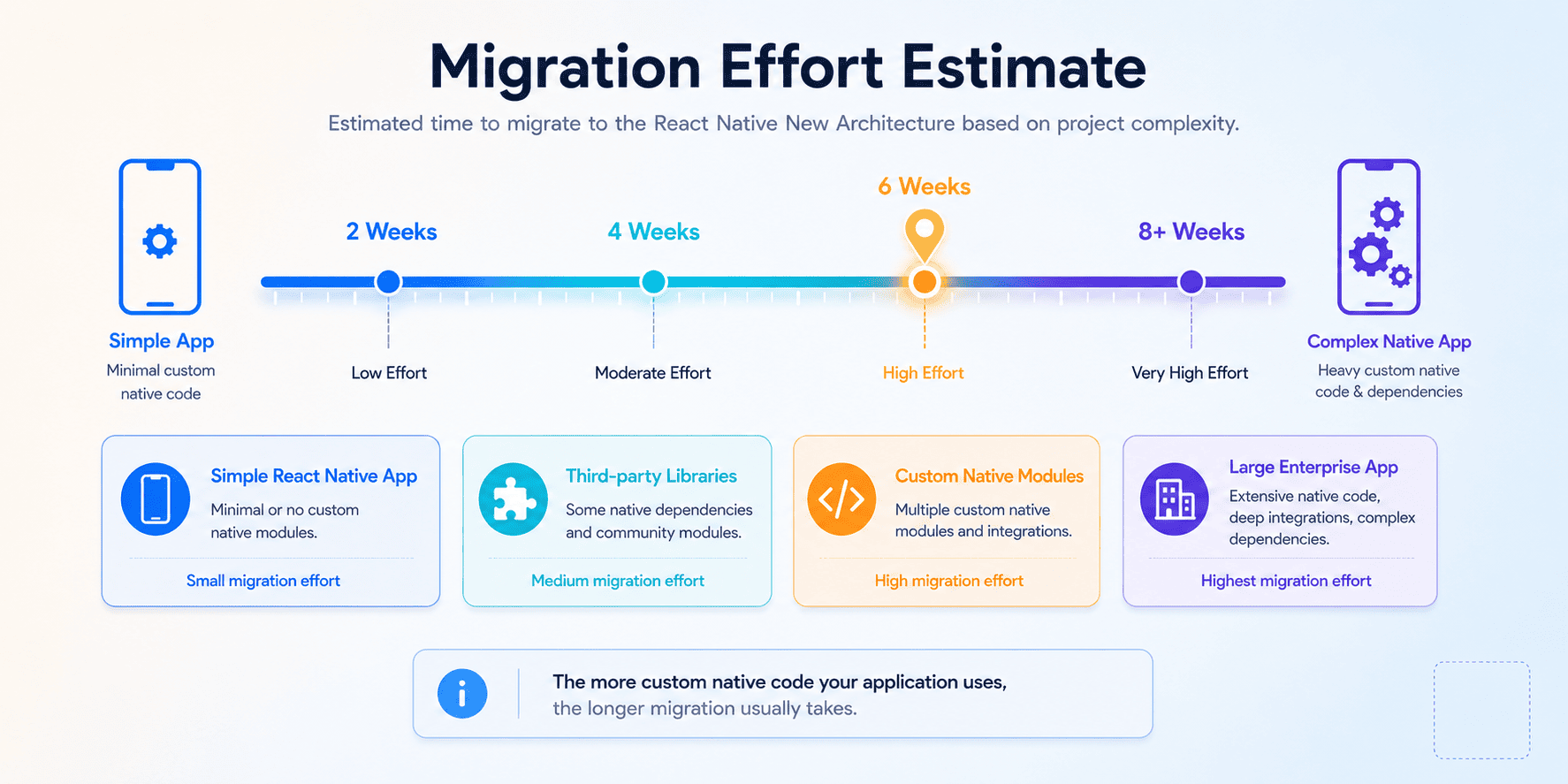
If you're on an older React Native version, migration starts with an audit, not a rewrite. Check every third-party native library your app depends on for New Architecture compatibility; most major libraries have already migrated, but some smaller or unmaintained packages haven't, and those are the ones that will block you. Hermes is now a requirement rather than a configuration choice, so confirm it's enabled. From there, most teams can expect the migration itself to take somewhere between two and eight weeks, depending mainly on how much custom native code the app has written directly against the old Bridge APIs. Apps that stayed close to standard libraries tend to move faster; apps with heavy custom native modules take longer.
Why Choose SpaceToTech for React Native Architecture & Development
Understanding JSI, Fabric, and TurboModules is one thing. Building and maintaining production apps on them, at scale, across markets, is another. Our team works on the New Architecture by default, not as a migration project, which means every app we build starts with the performance and type-safety benefits this guide covers baked in from day one. Whether you're planning a new React Native mobile app development project or auditing an existing app for migration, explore our React Native app development services to see how we approach architecture from the first sprint.