Businesses exploring AI increasingly face a more practical question: where should AI fit inside the product they already run, or the one they are about to build? That is the real question behind AI in custom software development: how do you put intelligence into software that is shaped around your workflows, your data, and your customers, instead of bending your business around a generic tool?
There is a second meaning of the phrase that we should clear up early. Some articles use it to describe developers using AI coding assistants to write and test code faster. This guide is about the other one: AI capabilities built into the finished application, such as prediction, document understanding, recommendations, conversational interfaces, and automated decisions. If you are exploring how our AI development services fit into a product plan, this article gives you the background to have a sharper conversation. If you are still deciding on the software itself, our custom software development guide covers that groundwork.
Below, we walk through what this looks like in practice, the use cases worth your attention, the technology and architecture choices behind them, how to integrate AI into new or existing systems, what to watch for on security and cost, and how to decide whether it makes sense for your business right now.
What Is AI in Custom Software Development?
AI in custom software development is the practice of building artificial intelligence features into software that is designed specifically for one organization’s processes, data, and users. The AI is not a plug-in bolted on afterward. It is part of how the product works: a claims platform that scores risk as a case comes in, a logistics dashboard that forecasts delays before they happen, an internal portal that reads incoming contracts and flags unusual clauses.
The result is often called custom AI software, and it usually combines three things:
- An application layer that your team and customers actually use.
- One or more AI models, such as machine learning models for prediction or large language models for text.
- Your own business data, which is what makes the output relevant to you rather than generic.
Compare that with buying an AI tool off the shelf. A subscription product can provide faster access to standardized capabilities, but your team may need to adapt its workflows to what the product supports. Custom AI software takes the opposite approach by allowing the application, integrations, and workflows to be designed around your specific requirements. That is the appeal, and it is also why the work takes more planning. If you want a partner to build the underlying platform, our custom software development services are the natural starting point before AI features are layered in.
AI-Assisted Development vs AI-Powered Custom Software
These two ideas get mixed up constantly, and search results for “AI software development” reflect that. They solve different problems.
| AI-assisted development | AI-powered custom software | |
| What AI does | Helps developers write, review, and test code | Performs a function inside the finished product |
| Who benefits | The engineering team | End users, operations teams, and customers |
| Where AI lives | In the development environment | In the running application |
| Typical examples | Code completion, automated test generation, code review help | Fraud scoring, demand forecasting, document extraction, support assistants |
| Main risk | Code quality and review discipline | Data quality, accuracy, privacy, and ongoing monitoring |
A team can do both at once, and many do. But they need separate thinking. AI-assisted coding is a productivity choice about your build process. Building AI into the product is a business decision about what your software should be able to do. This guide focuses on the second.
Why Businesses Add AI to Custom Software
Companies rarely add AI because it sounds modern. They do it because a specific process is slow, expensive, inconsistent, or blind to patterns in its own data. The reasons tend to fall into a handful of groups.
Workflow improvement. Many operational processes are made of small, repetitive decisions: where a request should go, who should approve it, which record matches which. AI business software can take over the routine ones and pass the unusual ones to a person.
Better decision support. Instead of giving a manager a report to interpret, intelligent business software can surface the items that need attention today, with the reasoning behind them.
Personalization. Products that adapt to each user’s behavior tend to feel more useful. That could be a learning platform that adjusts difficulty or a retail app that surfaces relevant items.
Data-driven operations. Most companies sit on years of transactions, tickets, documents, and sensor readings they barely use. AI solutions for businesses turn that stored data into forecasts, alerts, and classifications.
A caution worth stating plainly: AI does not automatically improve a broken process. If your approval flow is confusing, automating it will only make the confusion faster. Fix the process design first, then decide where intelligence adds value.
AI Use Cases in Custom Software
This is the part of the guide most readers come for, so we have kept it concrete. Each use case below works as a standalone AI feature or as one piece of a larger AI-powered application.
Intelligent Workflow Automation
Approvals, routing, data entry, status updates, and handoffs between departments are the classic candidates. Traditional automation follows fixed rules: if the amount is over a set value, send it to a manager. Intelligent automation adds judgment. It can read the content of a request, decide which team should handle it, spot missing information, and escalate only when something looks off.
The practical gain is not that people disappear from the process. It is that they stop spending their day on the cases that follow a pattern and give their attention to the ones that do not. Good AI automation software also records why it made each call, which matters when someone needs to audit a decision later.
AI Assistants and Conversational Interfaces
Conversational interfaces let people ask a system questions in plain language: a support assistant for customers, an internal helper that answers HR or IT questions, or a search layer over company documents. Natural language processing handles intent, and a language model handles the reply. The quality of these assistants depends less on the model than on the knowledge behind it and the systems it can connect to. If this is your priority, our dedicated guide to AI chatbot development covers design, training, and deployment in far more depth.
Predictive Analytics and Recommendations
Predictive analytics software uses historical data to estimate what is likely to happen next: which customers may churn, which shipments may be late, which loan applications carry higher risk. Forecasting, classification, and risk scoring all belong here.
An AI recommendation engine works from a similar idea but points it at the user. It suggests the next product, article, course, or action based on behavior and context. In both cases, the software supports a decision rather than making it alone, so a person can review the result before something important happens.
Document AI and Intelligent Data Extraction
Invoices, contracts, claim forms, medical reports, and shipping documents hold a lot of business-critical information locked inside files. AI document processing software combines OCR with language understanding to read those files, pull out the fields that matter, and send them into your system of record.
Contract review is a good example of where this helps. Rather than replacing a lawyer, AI contract review software can highlight unusual clauses, missing terms, and deviations from your standard language so that a human reviewer starts with a marked-up draft instead of a blank read-through. Intelligent document processing also cuts down on the manual re-typing that introduces errors.
Computer Vision
Computer vision software lets an application interpret images and video. Typical uses include visual inspection on a production line, classifying uploaded photos, verifying identity documents, reading meters or labels, and counting or tracking objects. Image recognition and object detection are the underlying techniques. Because these systems depend on the quality and variety of training images, they work best when the visual task is narrow and clearly defined.
AI Agents and Business Workflow Automation
AI agents go a step past assistants. Instead of only answering, an agent can plan a few steps, call tools, and complete a task: look up an order, check the policy, draft a response, update the record. That is what people mean by tool calling.
Treat AI agents as controlled automation rather than unrestricted autonomous workers. Define clear permissions, logging, escalation rules, and human oversight before allowing an agent to perform actions that carry financial, legal, or customer-facing consequences.
AI Technologies Used in Custom Software
You do not need to become a machine learning engineer to make good decisions here. You need to know which family of technology fits which problem. If you want to see the tools and frameworks we typically work with, our AI development technology stack page lists them.
Machine Learning and Predictive Models
Classic machine learning is the right choice when the core need is prediction or classification from structured data: scoring, forecasting, anomaly detection, segmentation. These models are usually smaller, cheaper to run, and easier to evaluate than language models. If your problem looks like “given these inputs, predict this number or label,” start here.
Generative AI and LLMs
Large language models generate and understand text, and increasingly images and audio. They power assistants, summarization, drafting, and search over documents. Many business applications pair an LLM with retrieval-augmented generation (RAG), where the system first searches your own documents, using embeddings stored in a vector database, and then asks the model to answer based on what it found. That keeps answers grounded in your content rather than the model’s general memory. We cover this area in detail in our article on generative AI development.
AI APIs and Model Integration
You do not always have to train or host a model yourself. Many teams connect to third-party AI models through model APIs and build the product logic, data handling, and user experience around them. This API-first approach is faster to start and often sensible for early versions. The trade-offs are ongoing usage costs, dependence on an outside provider, and questions about where your data goes. As a product matures, some teams keep the API for general tasks and move sensitive or high-volume tasks to models they control.
AI Architecture for Custom Software
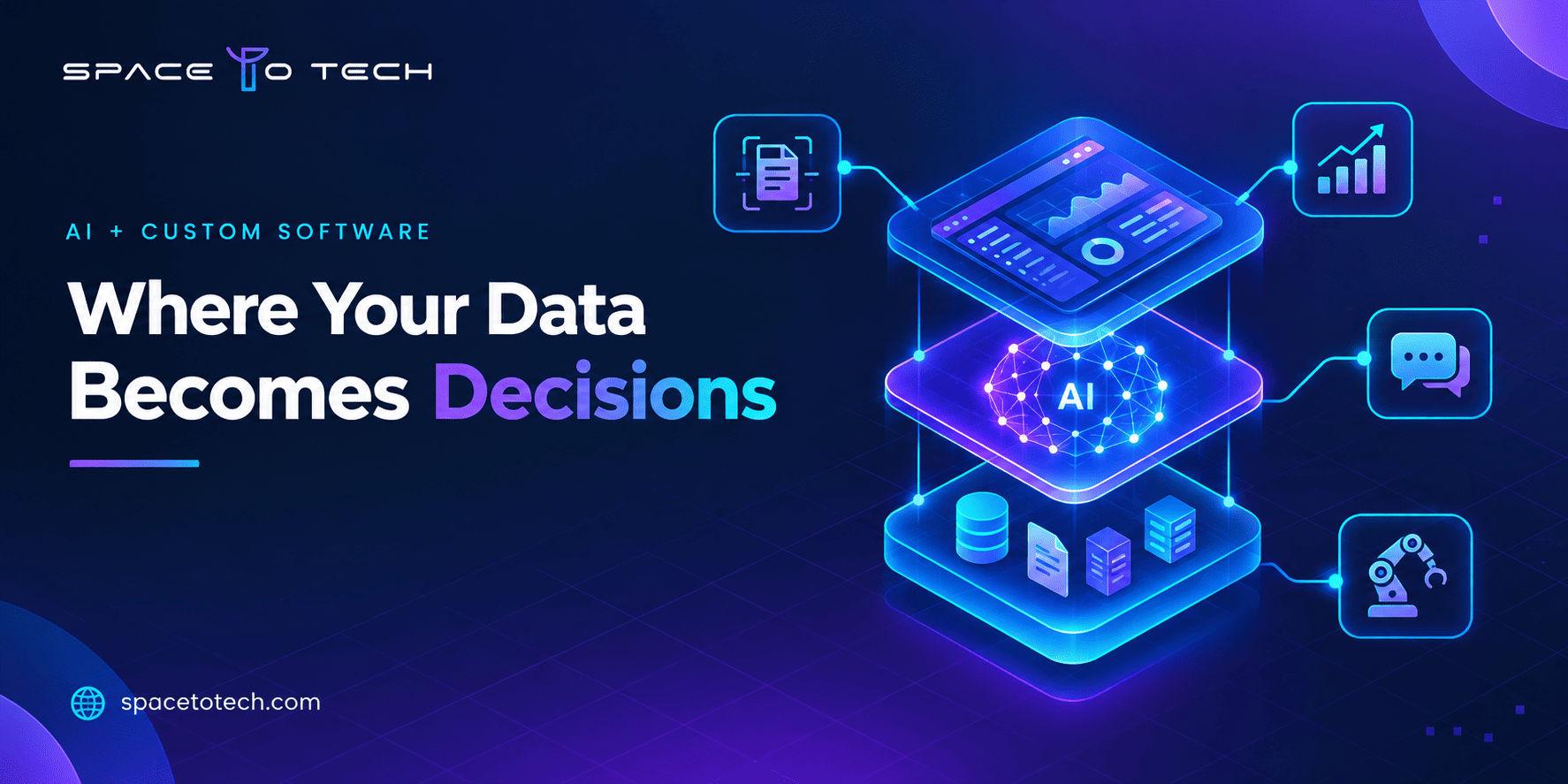
Good AI application architecture is mostly about keeping concerns separate, so you can change one part without breaking the rest. A production AI application can be organized into several layers, with the exact architecture depending on the use case and technology stack. A common structure includes:
- Application layer. The interface and business logic your users interact with, whether that is a web app, mobile app, or internal portal.
- AI and model layer. The models themselves, plus the prompts, retrieval logic, and routing that decide which model handles which request. Model routing can send simple tasks to a cheaper model and complex ones to a stronger one.
- Data layer. Databases, data pipelines, and vector stores that feed the models both structured and unstructured data.
- Integration layer. APIs and connectors that link the AI features to your CRM, ERP, payment systems, and older platforms.
- Monitoring and governance layer. Logging, evaluation, access controls, and alerts that tell you how the system behaves in production.
Two design concerns come up in almost every project. Latency matters because a model that takes too long to answer breaks the user experience. Scalability matters because inference costs and response times can change quickly as usage grows. It is much easier to plan for both at the start than to retrofit them after launch.
How to Integrate AI Into New or Existing Software
The approach differs depending on whether you are starting fresh or working with a system that is already running.
Building a new product. You can design around AI from the beginning: shape the data model to capture what the models will need, plan the interface around AI-assisted actions, and choose an architecture that leaves room for monitoring. This is the cleaner path, though it still pays to start with one or two AI features rather than a dozen.
Adding AI to existing software. Here the challenge is usually not the model. It is the surrounding system. Legacy systems may lack clean APIs, store data in inconsistent formats, or hold information in places that are hard to reach. Software integration work often comes first: exposing the right data safely, building an API layer, and making sure the AI feature can read from and write back to the core system without disrupting it.
Whichever route you take, look at these dependencies early:
- Where the data lives and who owns it.
- Whether the data is clean and consistent enough to use.
- Which systems the AI feature must read from or update.
- How LLM integration or AI API integration will handle failures, timeouts, and rate limits.
- How users will see, correct, and override AI output.
AI Implementation Process
A reliable AI implementation follows a sequence. Skipping steps tends to show up later as rework.
- Discovery. Understand the business objectives, the people involved, and the current process. Write down what success would look like in terms you can measure.
- Use-case selection. Rank candidate ideas by business value, feasibility, and risk. Pick one that is important but contained.
- Data readiness. Check whether you have enough relevant, accurate, and accessible data. This step often reshapes the plan.
- Architecture and model approach. Decide between classic machine learning, an LLM, an API-based model, or a mix. Choose the application and deployment design.
- Integration. Connect the AI feature to your existing systems and workflows.
- Testing and evaluation. Test the model against realistic cases, including messy and unusual ones. Measure accuracy, consistency, and failure behavior with a defined evaluation set, not a handful of demos.
- Deployment. Release gradually, often to a small group first, with human review in the loop.
- Monitoring and improvement. Track performance over time, watch for model drift as real-world data changes, and retrain or adjust when results slip.
A proof of concept or MVP is usually the smartest way through steps two to six. It lets you confirm that the idea works with your real data before committing to a full build. This is how AI implementation in business tends to go well: small, measured, and honest about what the first version can do.
Data, Security, and Governance Considerations
AI features handle information that can be sensitive, and they can produce output that is wrong with total confidence. Both facts call for deliberate controls.
- Data quality and data governance. Decide who owns each dataset, how it is cleaned, and how long it is kept. Poor data produces poor output regardless of the model.
- Data privacy and data security. Know what information is sent to a model, particularly when using an outside API. Remove or mask personal data where you can, and check where data is processed and stored.
- Access controls. Use role-based access so people and AI features only see the data they are meant to see.
- Audit logs. Keep a record of inputs, outputs, and actions so decisions can be reviewed and explained.
- Human oversight. Put a person in the loop wherever an error would be costly or hard to reverse.
- Monitoring. Watch for drift, unexpected behavior, and quality changes after launch.
Frameworks such as the NIST AI Risk Management Framework can help structure AI governance conversations inside a company. Requirements vary by country and industry, so involve your legal and compliance teams early instead of treating governance as a launch-week checklist.
Custom AI Software vs Off-the-Shelf AI Solutions
Custom is not always the better answer. The right choice depends on how much your process and data differ from everyone else’s.
| Off-the-shelf AI / AI SaaS | Custom AI software | Hybrid | |
| Best when | The need is common and well served by existing tools | The process, data, or experience is unique to you | You want speed now and control over key parts |
| Speed to start | Fast | Slower, needs planning and build | Moderate |
| Customization | Limited to the vendor’s options | High | Selective |
| Data ownership | Depends on vendor terms | You control it | Split, by component |
| Integration | May need workarounds | Built around your systems | Custom where it matters, standard elsewhere |
| Ongoing cost pattern | Subscription fees that grow with seats or usage | Higher upfront, maintenance over time | Mix of both |
| Main risk | Fitting your workflow to the tool | Scope creep and build effort | Complexity of managing two approaches |
Many teams land on a hybrid: a standard tool for commodity tasks like meeting summaries or basic support, and custom software where the AI touches proprietary data or a core workflow. That is a perfectly reasonable answer, and a good build vs buy discussion should be willing to reach it.
Benefits and Business Value
The technical features only matter if they connect to outcomes you can measure. Instead of quoting generic statistics, define your own before and after.
| AI capability | Business outcome | Metric to track |
| Workflow automation | Less manual handling, faster turnaround | Time per request, cases handled without escalation |
| Predictive analytics | Earlier action on risks and opportunities | Forecast accuracy, prevented delays or losses |
| Document AI | Fewer entry errors, faster processing | Documents processed per day, error rate |
| Recommendations | More relevant user experiences | Conversion, engagement, repeat use |
| Conversational assistants | Faster answers, lower load on staff | Resolution time, share of queries resolved without a person |
| Computer vision | More consistent inspection | Detection accuracy, rework rate |
Set a baseline before you build, agree on the KPIs with the people who own the process, and revisit them after launch. That is how ROI conversations stay grounded. If a feature cannot be tied to a number someone cares about, it is worth asking why you are building it.
AI in Custom Software Across Industries
The same building blocks show up in different forms across sectors. These are illustrations, not guarantees, and each project still depends on your data and constraints.
- Healthcare. Software that structures clinical notes, supports appointment and triage workflows, and extracts data from reports, with strict attention to privacy and clinical review.
- Logistics. Route and demand forecasting, delay prediction, automated processing of shipping documents, and exception handling.
- Manufacturing. Visual quality inspection, predictive maintenance signals, and production planning support.
- Retail and ecommerce. Recommendation engines, demand forecasting, search that understands intent, and support assistants for orders and returns.
- Insurance and finance. Claims triage, fraud detection, risk scoring, and document extraction from policies and forms.
- Education. Adaptive learning paths, automated feedback support, and assistants that help learners find material.
Each sector brings its own compliance and data challenges, so dedicated industry pages can go deeper once we have validated demand for them.
How Much Does AI-Powered Custom Software Cost?
Anyone who quotes a single price for AI custom software development cost without knowing your project is guessing. Cost depends on a set of drivers, and understanding them helps you budget sensibly.
- Scope. One focused feature costs very differently from a platform with several AI capabilities.
- Data. Cleaning, labeling, and preparing data can be a large share of the work, especially when it is scattered or inconsistent.
- Model choice. Using a third-party API, fine-tuning an existing model, or training your own each change the effort and running costs.
- Integrations. Connecting to legacy systems, CRMs, and ERPs adds engineering time.
- Security and compliance. Stricter privacy, audit, and access requirements add design and testing work.
- Evaluation and testing. Building proper test sets and review processes takes effort that is easy to underestimate.
- Infrastructure and inference. Hosting, usage fees, and scaling needs continue after launch.
- Monitoring and maintenance. Models need upkeep, so plan for ongoing costs, not only a build budget.
When you compare AI implementation cost across proposals, look at total cost of ownership over a year or two rather than only the build price. A cheaper build with no monitoring plan can cost more in the end.
Common Challenges and Mistakes
Most stalled AI projects fail for ordinary reasons. Watch for these:
- Starting with the technology instead of the problem. “We need AI” is not a use case.
- Underestimating data quality. Messy, incomplete, or biased data limits every result.
- Treating a demo as proof. A polished demo on clean examples says little about real-world performance. Build a proper evaluation set.
- Ignoring integration. A great model that cannot connect to your systems delivers nothing.
- No monitoring plan. Models drift as behavior, language, and data change. Without observability, quality decays quietly.
- Skipping human review. Full automation of high-stakes decisions too early creates risk.
- Ignoring scalability. A prototype that works for ten users may struggle at ten thousand.
- Overbuilding the first version. Ship something narrow, learn, then expand.
Does Your Business Need AI in Custom Software?
Use this short self-check before committing budget:
- Can you describe the business problem in one sentence, without mentioning AI?
- Do you have a number you want to move, and a baseline for it today?
- Is the relevant data available, reasonably clean, and legally usable?
- Does the process depend on your own data or workflow in a way an off-the-shelf tool cannot handle?
- Is there a person or team who will own the feature after launch?
- Can you start with a small pilot and expand based on results?
If you can answer yes to most of these, you likely have a solid candidate. If several answers are no, a discovery phase or a simpler tool may serve you better right now, and that is a perfectly good outcome.
Why SpaceToTech for AI Development
SpaceToTech is a software development company that builds AI-powered applications alongside web, mobile, and enterprise software, which matters because AI features rarely live alone. They sit inside products that need solid engineering, thoughtful design, and reliable integration.
Our approach to AI work mirrors the process above: we start with the business problem, check data readiness early, favor a focused first release, and design for monitoring and security from the start. You can see the kind of products we have delivered in our portfolio. For businesses planning AI-powered software in the US market, we also provide dedicated AI development services in the USA, alongside our work with teams across the UK, UAE, India, and Australia. We build for both new products and existing systems that need to gain AI capabilities without being rebuilt.
Conclusion
Adding intelligence to your software is less about chasing a trend and more about choosing the right problem, preparing your data, and building carefully. Start narrow, measure honestly, and expand once the first feature proves itself. If you want to explore where AI could fit into your product or workflow, our team can help you scope it through our custom AI development services.