
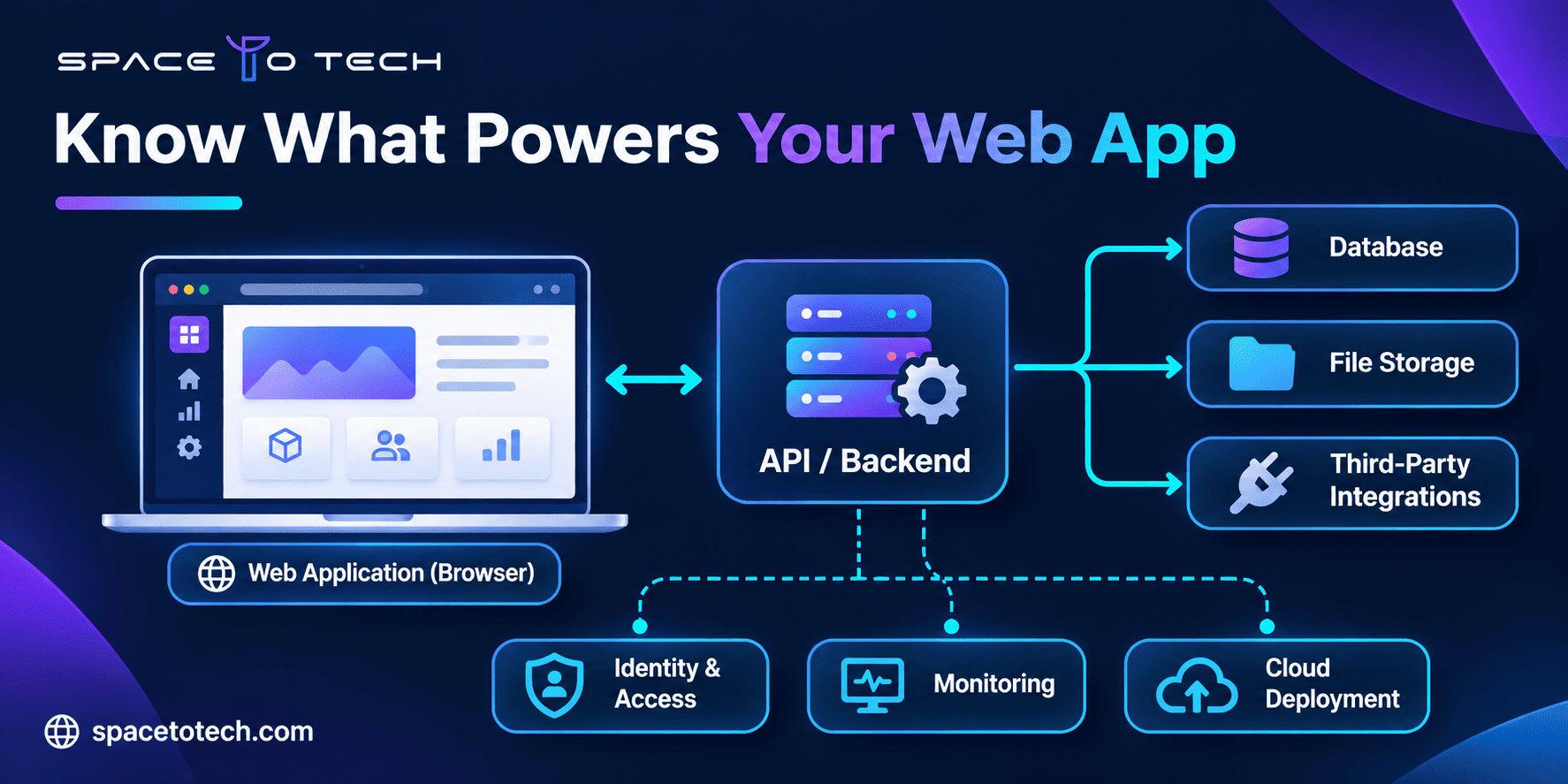
Imagine a founder launching a B2B client portal. Customers need to log in, upload contracts, track approval status and receive updates. The demo looks polished. Yet the proposal says very little about who can see each file, where data lives, or what happens when the CRM connection stops working. Those omissions are architecture questions, not design details.
Web application architecture explains how the moving parts of a product are structured and connected. For a founder, that knowledge makes agency proposals easier to evaluate, exposes expensive assumptions early and helps prevent a promising product from becoming difficult to maintain. The broader web development planning process covers requirements, design and delivery; here, we focus on the system decisions that sit underneath them.
You will learn how a real request travels through a web application, what the main components do, when common architectural patterns fit, and which questions to ask before approving a build.
What Is Web Application Architecture?
Web application architecture is the blueprint for how a web product’s components are separated, connected, deployed and operated. It answers questions such as where business rules run, how data is stored, how users are authenticated, how external systems connect and what happens during failures.
It is not the same as the visual design. A clean user interface tells you what customers see; architecture determines which systems make the interface work and how safely they exchange information.
Architecture vs. tech stack vs. product scope
Decision | Question it answers | Example |
A proposed stack is not a complete architecture. An agency can name React, Python and AWS without explaining role permissions, integration boundaries, audit logs or deployment ownership. Ask for the responsibilities and connections between components, not only a logo list.
Why founders and CTOs should care before development
Architecture affects change cost. If a client-specific rule is tangled with shared workflows, adding a new customer may break existing behavior. If every service makes synchronous requests to a fragile third-party API, one outage may halt the entire product. If the cloud accounts belong to an agency without agreed transfer terms, vendor switching becomes harder.
Good design does not mean predicting every future feature. It means isolating important responsibilities, making assumptions visible and keeping likely changes manageable.
How Does a Web Application Work? A B2B Portal Example
Consider a client manager who submits a contract for approval. Here is a simplified flow. Real implementations differ, but the sequence shows which questions an architecture must answer.
- The user signs in. The browser sends credentials through a secure connection, and the identity system establishes a session or token.
- The user uploads a document. The backend validates the request, checks their company and role permissions, and applies file restrictions.
- The application stores the file in appropriate storage and records its metadata and approval state in a database.
- The application creates an approval task. A notification job may run asynchronously so a slow email provider does not delay the upload response.
- A reviewer opens the task. The backend checks authorization again, retrieves permitted data and records the decision.
- The portal updates the customer-facing status and writes an audit record. Monitoring reports errors or unusual delays to the operations team.
The key insight: the interface is only one part of the journey. Permission checks, asynchronous jobs, stored records, observability and third-party dependencies affect whether the workflow is trustworthy.
Simplified architecture diagram, explained in words
Component | What passes through it | Question for the buyer |
This is an educational simplification rather than a production blueprint. Caches, load balancers, CDNs, secrets management and other services may be necessary depending on the product.
The Main Components of Web Application Architecture
Frontend: the interface users operate
The frontend renders pages and handles user interaction. It may contain form validation and presentation logic, but security-sensitive business rules must be enforced on trusted systems as well. A button hidden from an unauthorized user is not a substitute for a backend authorization check.
For a B2B portal, assess accessible form interactions, table navigation, account switching, error handling and responsiveness. A slow or confusing interface can interrupt sales onboarding and customer self-service even when the backend is functioning.
Backend: the rules that protect the workflow
The backend applies the rules: who can access a contract, when an invoice can be approved, and which actions should trigger notifications or integration updates. This is where responsibilities should have clear boundaries so that changing one workflow does not unexpectedly alter another.
Before commissioning custom web application development, ask the team to describe the business rules in plain language and identify the components that enforce them.
Database and storage: the system of record
Databases typically manage structured entities such as organizations, users, approvals and transactions. File storage may hold large uploaded documents. These systems need permissions, retention policies, backups and restoration tests suited to the business requirements.
Not every application needs multiple databases, a data warehouse or a complicated caching layer. More infrastructure adds deployment and operational responsibility. Start with the information the product must store, how it will be queried and how accuracy will be maintained.
APIs and integrations: connecting the business
An API is an agreed interface between systems. For example, a portal may fetch customer details from a CRM and send approved invoices to an accounting platform. The architecture must specify authentication, error handling, retry behavior, data mapping and which system is authoritative for each record.
Integrations often become more difficult than the screens themselves. A contract should clarify whether external API access is available, who pays for the service, how rate limits work and what the product does when the external provider is down.
Infrastructure, deployment and monitoring
Infrastructure includes the environment where the application runs, how releases are deployed, how secrets are protected and how the team monitors failures. A staging environment, automated tests, health checks and a rollback procedure are often more useful early on than a complex container platform that no one can maintain.
A proposal should identify the owner of the cloud account, repositories, domains, databases and monitoring tools. Clear access and handover arrangements reduce lock-in.
Common Types of Web Application Architecture
Architecture labels often mix several concepts. Monolith and microservices describe deployment and service boundaries; three-tier describes logical separation; serverless describes an execution and operating model. They can coexist in the same product.
Approach | How it works | Good fit when… | Main trade-off |
Monolith vs. microservices: what matters for a founder?
A monolith is not automatically obsolete, and microservices are not automatically scalable. A well-designed monolith may serve a substantial user base. Poorly partitioned microservices can create a distributed system that is harder to debug, secure and deploy than the original application.
Independent scaling becomes valuable when workloads truly differ. For example, an image-processing pipeline might need separate compute capacity from a customer portal. That is a concrete reason to separate a component. “We might grow rapidly” is not, by itself, a complete architectural justification.
Why modularity matters more than trendiness
A modular architecture creates clear boundaries around areas such as accounts, billing, approvals and reporting. Those boundaries improve testability and help a team change one feature without having to understand every line of the product. If future needs justify splitting a module into an independent service, good boundaries can make that transition easier, although it still requires work.
Microsoft’s guidance on common web application architectures discusses trade-offs between deployment structures. The decision should follow the workload and team, not an assumed hierarchy of sophistication.
Which Architecture Fits Your Business?
A startup testing an MVP
For an early-stage product, learning speed, a complete core workflow and manageable operating costs usually matter more than supporting hypothetical millions of users. A simple layered design or modular monolith is often worth evaluating. Document the data model, auth model and integration boundaries, then delay complexity until requirements justify it.
A multi-tenant SaaS application
SaaS introduces questions about tenant isolation, permission models, billing, account administration, usage limits, data retention and regional requirements. The biggest risk may be incorrect separation of customer data rather than raw traffic volume.
Ask whether tenant context is checked consistently across APIs, background jobs, exports, logs and storage access. If the system grows, modules with distinct operational needs can be evaluated for independent scaling.
An enterprise client portal or operations platform
Enterprise buyers may require SSO, existing ERP/CRM connections, audit trails, approval chains and integration with legacy systems. Architecture should begin with a map of the current systems and their data ownership. A new application that duplicates critical customer records without synchronization rules can increase operational work instead of reducing it.
A marketing website with interactive features
Not every business needs a complex application backend. A content-led site with a form and a few integrations may suit a simpler platform. The distinction between a website and web application helps clarify whether the proposed architecture is proportional to the required functionality.
How Architecture Affects Cost, Security, Performance and Scale
Development cost and total cost of ownership
The cheapest initial build is not necessarily the least expensive to maintain. Architecture affects how many services the team deploys, how many environments it maintains, how many integrations need testing and how incidents are investigated.
Assess cost across discovery, development, quality assurance, hosting, monitoring, licensing, support and future changes. Avoid estimates based only on the number of screens. Two applications with the same screen count can have radically different security, integration and operational needs.
Security, privacy and role boundaries
Security should be designed into the application’s identity, data and integration boundaries. Discuss least-privilege access, encryption where appropriate, secure configuration, dependency updates, audit logging, incident response and recovery expectations. A cloud vendor or framework alone does not make the software secure.
Security planning must include the people who administer accounts and deployments. Owners should know who can access production data, who approves configuration changes and how credentials are rotated.
Performance, accessibility and reliability
Performance depends on how requests flow, database queries, caching and network latency. Reliability depends on failure isolation, monitoring, redundancy when justified and recovery procedures. Both need measurable acceptance targets rather than statements such as “fast” or “enterprise-grade.”
Accessibility also belongs in product acceptance criteria. The WCAG 2.2 accessibility requirements cluster explains user-interaction standards in greater depth; architecture and component design should allow teams to test those requirements throughout delivery.
A practical risk-and-response table
Business risk | Architecture question | Reasonable mitigation to evaluate |
How to Evaluate a Web Application Architecture Proposal
Before an agency commits to an implementation, it should have enough information to explain the main components, assumptions, risks and trade-offs. A giant technical diagram is not necessary for every project. A clear one-page system view and a list of open decisions can be more useful.
Begin with written requirements, not vendor preferences
Write down the users, top workflows, permissions, required integrations, expected activity, security expectations and launch priorities. A structured web application requirements document lets teams compare proposals against the same business needs.
A founder-friendly architecture review scorecard
Review area | What a useful proposal should explain | Red flag |
Questions to ask your software development partner
- Which business requirement drove the most important architecture choice?
- Can you show the end-to-end flow for our highest-value user action?
- Which components are custom built and which use managed services?
- How will customers, user roles and company data be kept separate?
- What happens if the payment, CRM, identity or email provider becomes unavailable?
- What is deliberately out of scope for launch, and what would trigger redesign?
- How will we test, monitor and recover this system after release?
- What documentation, accounts and source code will we own at handover?
If comparing web development companies in India, ask each prospective partner these same questions. The comparison is useful only when vendors respond against the same project requirements and acceptance criteria.
Common Architecture Mistakes That Create Rework
Overengineering before a product has evidence
An early-stage portal rarely benefits from operating a complex network of independently deployed services solely because microservices appear modern. Operational sophistication should solve a demonstrated problem. Start with explicit boundaries, tests and monitoring that match the team’s capacity.
Underestimating integration and data migration
Existing systems rarely expose perfectly clean data or stable interfaces. Verify API access, data schemas, identity matching, rate limits and migration volume before approving timelines. If historic records are required, define which records and what accuracy checks are needed.
Treating compliance as a final milestone
Some security, privacy, accessibility and contractual obligations affect data structure and deployment choices. They cannot be reliably added as a last-week visual review. Capture the applicable requirements during discovery and test against defined acceptance criteria.
No operational owner after launch
Even well-written software requires patches, incident handling, backups, credential management and monitoring. The proposal should distinguish build completion from ongoing operations. Confirm whether the customer, the development partner or another provider will own each responsibility.
Web Application Architecture Checklist Before Signing Off
- Our product’s primary users and two or three critical journeys are documented.
- We know which system owns customer data and how it is accessed.
- User roles, organization boundaries and authentication are defined.
- Every critical integration includes failure and recovery assumptions.
- The team can explain why its architecture fits today’s workload.
- Testing, accessibility, monitoring, backup and release requirements are written down.
- We have agreed who owns repositories, cloud accounts, keys and documentation.
- Potential future scaling triggers are named without pretending to predict every growth scenario.
- The proposal describes exclusions, handover and long-term maintenance.
Build an Architecture That Fits the Product, Not the Trend
For founders and B2B buyers, the point of web application architecture is not to become a software architect. It is to ask enough informed questions to understand whether the proposed system can support users, protect data, integrate with the business and adapt without unnecessary cost.
A practical design starts with the work the product must perform, tests its assumptions and leaves a sensible path for future change. More services, more databases or a fashionable stack do not automatically create a better business outcome.
SpaceToTech is a global software development company supporting businesses with custom applications and digital platforms. If you are scoping a SaaS product, customer portal or enterprise workflow, an architecture discovery discussion can clarify the core journeys, integration constraints, deployment ownership and the decisions that need evidence before a proposal is finalized.