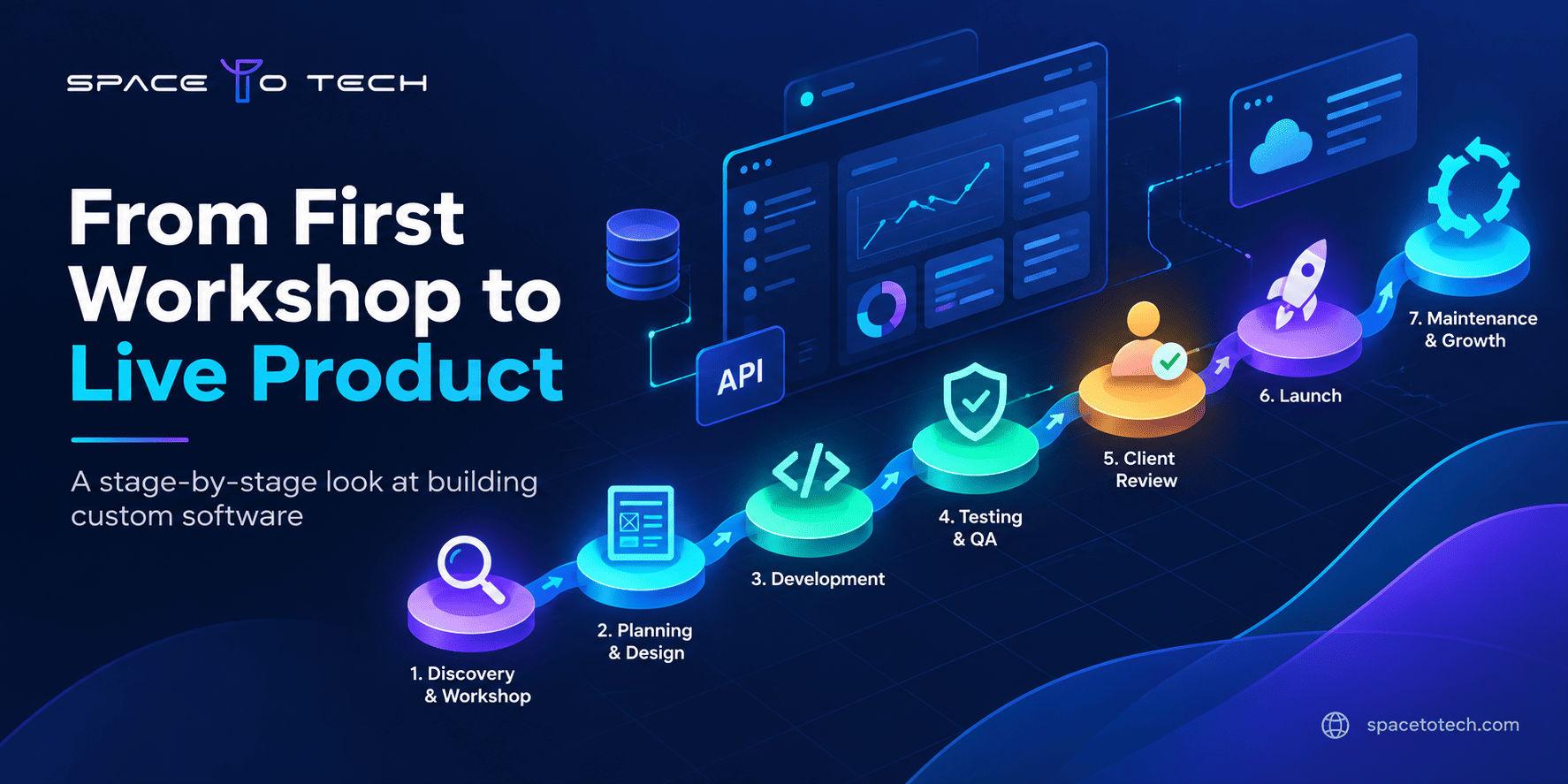
Quick answer: The custom software development process moves through seven practical stages: discovery and requirements, architecture and design, development sprints, QA and testing, user acceptance testing, deployment and launch, and ongoing maintenance. Stages often overlap and loop back, because every stage produces decisions the next one depends on.
Most people who search for the custom software development process are not looking for a textbook definition. They want to know what they will be asked to do, what the team will hand back, and when they can safely say "yes, move on."
That is what this article covers. If you need the broader picture first, our custom software development process guide walks through the fundamentals, benefits, types and costs. Here, we stay inside the lifecycle and look at each stage in practical terms: what happens, what you contribute, what you should receive, and what to confirm before the project advances.
Custom Software Development Process at a Glance
| Stage | Main purpose | Key output |
| 1. Discovery and requirements | Understand the problem, users and constraints | Agreed scope and prioritized requirements |
| 2. Architecture and UI/UX design | Decide how the system will work and feel | Technical plan, wireframes, prototypes |
| 3. Development sprints | Build the product in working increments | Working features demonstrated each sprint |
| 4. QA and testing | Find and fix defects before users do | Test results and resolved issues |
| 5. User acceptance testing (UAT) | Let business users confirm it fits real work | Acceptance feedback and sign-off |
| 6. Deployment and launch | Move the software into production safely | Live release, monitoring, handoff notes |
| 7. Maintenance and improvement | Keep the software secure and useful | Fixes, updates and planned enhancements |
There is no single fixed number of stages in the industry. Some teams describe six, others seven or eight. In this guide, we break the lifecycle into seven practical stages because it keeps each decision point easy to see. Real projects are also rarely a clean staircase. A design review may reveal a missing requirement, and a sprint demo may change the priority list. That is normal. What matters is that each change is discussed and recorded before it affects the next stage.
What Is the Custom Software Development Process?
It is the structured path from a business problem to a working, supported software product. Instead of adapting your workflow to a packaged tool, the team builds software around how your business already operates, or how you want it to operate.
The process matters because custom software is expensive to change late. A misunderstood requirement costs very little to fix in a conversation and a great deal to fix after the code is written. Each stage in the software development lifecycle exists to catch a different kind of misunderstanding while it is still cheap.
A typical custom software project moves through discovery and scoping, architecture and design, development, QA and testing, UAT, deployment, and ongoing support. The sections below follow that flow.
1. Discovery and Requirements
What happens during discovery?
Discovery is where the team learns your business before writing anything. Expect stakeholder conversations, workflow walkthroughs, a review of existing systems, and honest questions about what success looks like. The goal is to turn a loose idea into a scope that everyone reads the same way.
What should be defined before development starts?
At minimum, you want clarity on four things:
- The problem and the users. Who will use the software, and what is slowing them down today?
- Functional requirements. What the software must do, written in terms a non-technical person can verify.
- Non-functional requirements. Performance, security, availability and compliance expectations.
- Priorities and constraints. What is essential for launch, what can wait, and what limits apply to budget, systems or timing.
Requirements also look different by industry. A site-management tool for a builder has very different data and field-access needs than a finance dashboard, which is why custom software development for construction starts from a different set of questions than a generic project would.
Discovery is also the right moment to decide how you will measure results. If you cannot say what "better" means in numbers or outcomes, it is hard to prove value later. Our breakdown of software ROI explains why those outcomes should be defined before a single feature is built.
What should you receive from this stage?
You should leave with a written scope, a prioritized requirements list, and a clear view of known risks and open questions. The exact format varies between teams, so ask what the document will look like and who signs it off.
What you provide: business rules, process knowledge, access to current systems, and the time of people who actually do the work.
What to confirm before moving forward: the scope, priorities, known risks and open questions should be documented and understood by the people responsible for approving the project.
Common mistake: treating discovery as a formality. Skipped or rushed discovery is the most common source of scope disputes later.
2. Architecture and UI/UX Design
Once the scope is clear, the next stages turn those decisions into the architecture, design, development, testing and deployment work behind a custom software solution. Architecture and design belong in the same stage because the screens people see depend on the structure underneath, and the structure has to support the screens people need.
System architecture and technical planning
This is where the team decides how the software is put together: the database structure, how components talk to each other through APIs, which third-party systems it connects to, and how it will handle security and growth. The choice of technology stack is made here, and it should be explained in terms of your needs rather than the team's preferences.
Architecture is also where AI features either fit cleanly or become a painful retrofit. If an intelligent feature is part of your product vision, the thinking in our guide on AI in custom software development is worth reading before this stage closes, since data, infrastructure and integration choices all depend on it.
UI/UX flows, wireframes and prototypes
Designers map user flows, sketch wireframes, and often build clickable prototypes. The value is simple: it is far cheaper to change a prototype than finished code. Put real users in front of it if you can.
What should be approved before development?
Before building begins, confirm the architecture direction, the key user flows, and the assumptions behind the scope. If a prototype made someone say "wait, that is not how we do it," this is the time for that conversation.
What you provide: feedback on flows, input on integrations and access to the systems the software must connect with.
What to confirm before moving forward: the architecture direction, the main user flows and the scope assumptions are agreed in writing, and any integration risks have an owner.
Common mistake: approving designs without testing the core flow with someone who will use it daily.
3. Development Sprints
What happens during a development sprint?
Development is usually organized into short cycles called sprints. A typical sprint follows a simple loop: plan what to build, build it, review the result with you, collect feedback, and reprioritize. The team works from a backlog, a ranked list of features and tasks drawn from the requirements.
Along the way, developers use version control to track every change and peer code reviews to catch problems early. At the end of each sprint, you should see working software, not a status slide.
How Agile fits into custom software development
Agile is a way of delivering in increments and adjusting as you learn. In practice, agile custom software development means you see progress regularly, can redirect priorities between sprints, and avoid waiting months to discover that something is off. It does not mean "no plan." The architecture and scope from earlier stages still guide the work.
What you provide: timely answers to questions, feedback on demos, and a single point of contact who can make decisions.
What you should receive: working increments, demo sessions, and visibility into what is done, in progress and next.
What to confirm before moving forward: each sprint's outcome matches what was planned, and the backlog priorities for the next sprint reflect your latest feedback.
Common mistake: slow feedback. A demo nobody reviews is a missed correction that returns later as rework.
4. Quality Assurance and Testing
Why QA should start before launch
Testing is not a final gate at the end of development. Good teams test as features are built, so defects are found while the code is still fresh in the developer's mind. Leaving it all to the end concentrates risk into the weeks you can least afford problems.
Types of testing used in custom software
- Functional testing checks that each feature does what the requirements say.
- Integration testing confirms that modules and external systems work together.
- Regression testing makes sure new changes have not broken existing features.
- Performance testing looks at speed and stability under realistic load.
- Security testing checks for vulnerabilities in access control, data handling and dependencies.
Not every project needs every category at the same depth. A small internal tool and a customer-facing platform handling payments have different testing priorities, and a good team will explain the reasoning.
What you provide: realistic test data and clarity on critical business scenarios.
What you should receive: test results, a record of defects found and fixed, and an honest list of anything still open.
What to confirm before moving forward: critical and high-priority defects are resolved, and any remaining known issues are listed and accepted by you.
Common mistake: assuming the build team's testing replaces your own validation. That is what the next stage is for.
5. User Acceptance Testing (UAT)
What happens during UAT?
UAT is where the people who will actually use the software confirm that it works for their real tasks. QA asks, "Does the software work as built?" UAT asks, "Does it do what the business needed?" Those are different questions, which is why UAT deserves its own stage rather than being folded into testing.
A typical UAT round includes agreed test scenarios, hands-on use by business users, feedback logged as defects or change requests, fixes, and retesting. It ends with formal acceptance against the criteria set earlier.
What you provide: the right testers, enough of their time, and clear acceptance criteria.
What you should receive: a documented list of resolved issues and a sign-off point you control.
What to confirm before moving forward: every high-priority requirement from discovery has been checked by someone who will rely on it, and the acceptance decision is recorded.
Common mistake: letting UAT drift into new feature requests. Anything new should be logged separately so it does not delay launch.
6. Deployment and Launch
What should be ready before go-live?
Deployment moves the tested software from a staging environment into production, where real users and real data are involved. Before that happens, check that:
- the production environment is configured and secured,
- data migration, if needed, has been rehearsed,
- user access and permissions are set up,
- monitoring is in place so problems are noticed quickly,
- a rollback plan exists in case something goes wrong, and
- documentation and handoff notes are ready for your team.
Some launches are a single switch. Others roll out to a small group first, then expand. Both are valid. The right choice depends on how many people rely on the system and how costly an interruption would be.
What you provide: final approvals, access credentials and a launch-day contact.
What to confirm before moving forward: the go-live checklist is complete, the rollback plan is understood, and someone on your side owns the launch decision.
Common mistake: treating launch as the finish line. It is the point where real usage starts producing the most useful feedback.
7. Maintenance and Continuous Improvement
Why custom software needs ongoing maintenance
Software does not stand still after launch. Operating systems change, third-party services update, security issues are discovered, and your own business keeps evolving. Maintenance covers bug fixes, security patches, dependency updates and performance monitoring.
Continuous improvement is the other half. Once people use the software daily, they will find things to refine and ideas to add. A short feedback loop and a prioritized improvement backlog turn the first release into a product that keeps earning its place.
What you provide: usage feedback and a clear sense of which improvements matter most.
What you should receive: a defined support arrangement, regular updates and a transparent way to request changes.
What to confirm before moving forward: the support scope, response expectations and the process for requesting enhancements are agreed before the project team steps back.
Common mistake: budgeting for the build and nothing for what comes after.
Agile vs. Waterfall vs. Hybrid: Which Fits Custom Software?
The lifecycle above describes what needs to happen. The methodology describes how the work is organized around it.
- Waterfall completes each stage before the next begins. It suits projects with fixed, well understood requirements and strict approval gates.
- Agile delivers in short iterations and adapts based on feedback. It fits projects where requirements will sharpen as people see working software.
- Hybrid combines the two, often with thorough upfront planning and architecture, followed by iterative delivery.
No single option is right for every project. Many custom builds land on a hybrid because discovery and architecture benefit from careful upfront thinking, while development benefits from regular feedback. The point of choosing a methodology is to match the way you work, not to follow a trend.
What Should You Receive at Each Stage of a Custom Software Project?
| Stage | What you should receive | What you approve |
| Discovery | Scope, prioritized requirements, risk list | Scope and priorities |
| Architecture and design | Technical plan, wireframes, prototypes | Architecture direction and key flows |
| Development sprints | Working increments and demos | Sprint outcomes and next priorities |
| QA and testing | Test results and defect status | Readiness for business testing |
| UAT | Resolved issues and acceptance record | Formal acceptance |
| Deployment | Live release, monitoring, handoff notes | Go-live readiness |
| Maintenance | Fixes, updates, improvement plan | Enhancements and support terms |
Ask your team to confirm these outputs early. If a stage has no visible output, it is hard to know whether it is complete.
What Is the Client's Role in Custom Software Development?
Software development client responsibilities are easy to underestimate. Projects move at the speed of decisions, and most of those decisions belong to you. In practice, your role includes:
- sharing business rules, workflows and subject-matter expertise,
- giving access to systems, data and the people who use them,
- reviewing demos and prototypes promptly,
- making approvals at the end of each stage, and
- testing during UAT with people who know the work.
You do not need to be technical. You do need to be available, and ideally to name one person who can speak for the business.
Common Risks That Delay Custom Software Projects
Most delays trace back to a handful of causes, and each appears at a predictable stage.
- Unclear requirements (discovery): vague goals create arguments later about what was promised.
- Scope creep (any stage): adding features without adjusting time or priorities pushes everything back.
- Slow decisions and feedback (design and sprints): waiting on approvals stalls the team.
- Integration complexity (architecture and development): connecting to older or poorly documented systems often takes longer than expected.
- Testing gaps (QA and UAT): skipped scenarios turn into production problems.
- Launch readiness gaps (deployment): missing data, access or monitoring causes avoidable surprises.
The remedy is rarely heroic. Clear scope, quick feedback and honest conversations about trade-offs handle most of these before they grow.
If you're comparing development partners, our guide on how to choose a custom software development company in the USA covers what to evaluate before you commit.
How Long Does Custom Software Development Take?
There is no honest universal answer. Duration depends on scope, the number of integrations, the complexity of the logic, the size of the team, and how quickly feedback and approvals arrive. A focused internal tool and a multi-module platform are very different undertakings.
What you can do is ask for a timeline broken down by stage, with the assumptions stated. That makes it easier to see where time is going and which decisions could speed things up. If budget planning is part of your thinking, our breakdown of custom software development cost in the USA shows how scope and complexity connect to pricing.
What Can Change the Timeline?
A timeline is an estimate built on assumptions. When an assumption changes, the schedule moves with it. The most common factors are:
- Changing requirements: new ideas after discovery are normal, but each one needs to be weighed against time.
- Integrations: connecting to external or legacy systems adds work, especially when documentation is thin.
- Approval delays: a sprint that waits days for a decision loses momentum.
- Data migration: moving and cleaning existing data often takes more effort than expected.
- Testing complexity: more user roles, devices and scenarios mean more to verify.
- Compliance and security requirements: regulated environments add review steps and extra documentation.
- Scope changes: adding features mid-project without trading something out extends the plan.
Raise these early. A team that knows about a data migration or a compliance review in week one can plan for it. One that finds out in week ten usually cannot.
Planning Your Own Project
Understanding the process is the first step. The next is finding a team that explains each stage as clearly as this article does. If you are ready to talk through your requirements, the team at SpaceToTech, a software development company focused on building software around real business needs, can walk you through scope and next steps.